





Waterproof USB Connector: Seal the Device, Not Just the Port
A waterproof USB connector is one that will generally pass the sample review without any problem. It seems to be the real problem that comes later after the product has been exposed to rain, washed, dropped or charged while wet.
Water will not get in through the front opening. It can wrap around the connector shell, follow a mounting screw, go to the back of the PCB or stay in the plug cavity long enough to cause corrosion of the contacts.
That's why asking the question, 'What IP rating does the connector have' should not be the first one you ask. This should read, “Where will the water go in the completed product?”
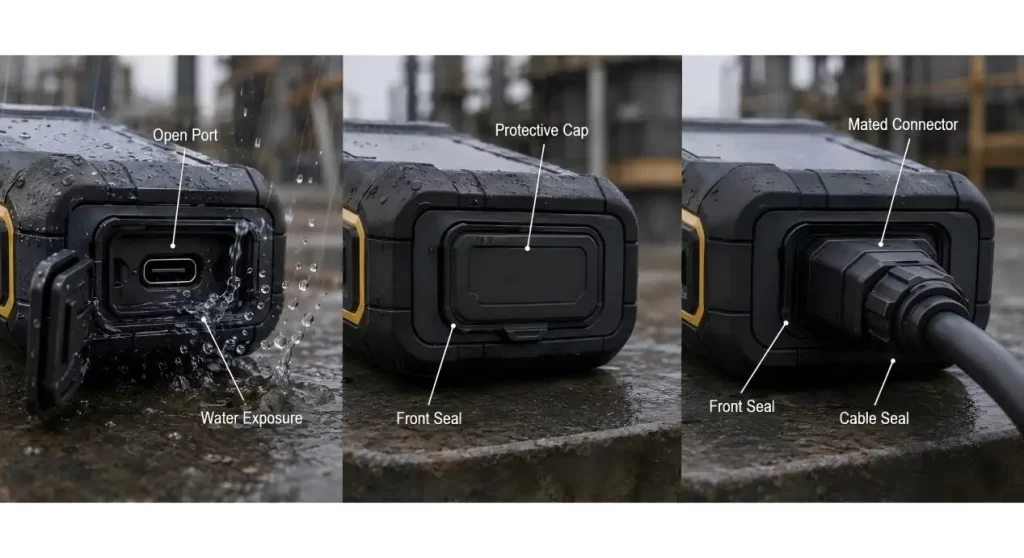
Determine the Wet Condition Prior to Selection of the Connector
There are three very different ways a port can be exposed:
- Switch on without a cable plugged in;
- Plugged into a USB port;
- The end of the stem was covered with a cap to protect it.
A connector can be a sealed connector at the panel, but an overmoulded cable or external boot at the connector when mated. A dust cap can help to improve the protection of the storage compartments without creating a watertight seal when charging the compartments.
List the state to withstand rain, spray, temporary submersion or cleaning. Hanxia's How to Guide for the waterproof USB Type-C connector also considers the difference between front-interface sealing and sealing by the complete-mated system.
Use the IP rating as a Test Boundary
Though the term “waterproof” is good marketing terms, it is incomplete engineering information.
The IP rating is valid for a particular product configuration and test condition. The buyer shall verify if the claim is for a connector only, a connector mounted in a reference panel or an enclosure assembly.
Hanxia's IP67 USB Type-C connector is said to be designed for dust and moisture, and for use in harsh industrial environments. The project still has to be secured for the selected model for the accurate mounting, the gasket, the test state and its acceptance methods.
A bigger number will not compensate for a bent panel, damaged gasket or even an improperly supported connector.
Follow the Leak Paths – Every Possible Leak Path
Most of the designs for waterproof connectors incorporate more than one barrier.
The front seal can be pressed against the enclosure. The terminal side may be protected by use of a moulded rear section or a potting compound. Shell tabs, panel fasteners and cable entries may be present, and provide distinct paths requiring control.
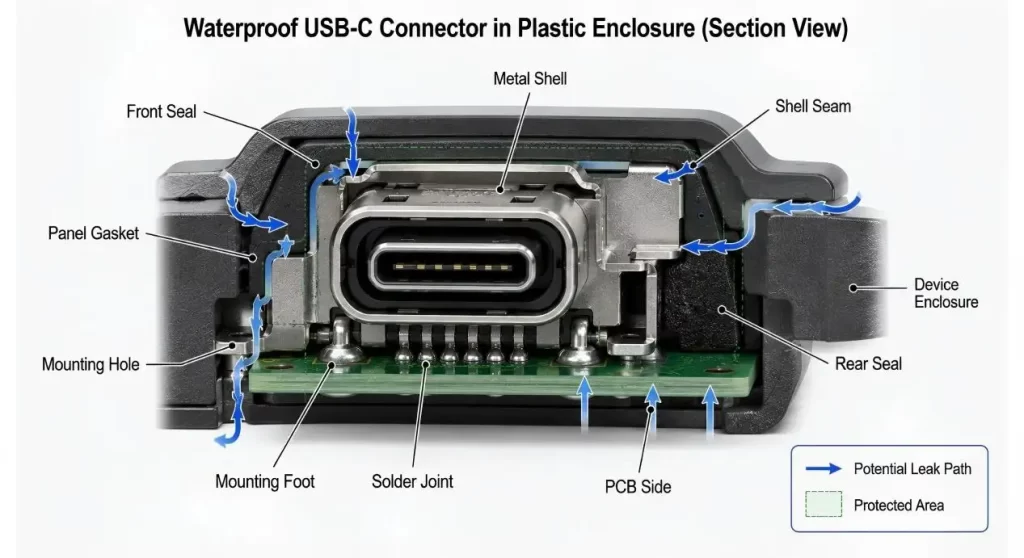
Look closely at:
- the area where bezel and housing are joined;
- gasket compression;
- panel flatness;
- shell seams;
- mounting holes;
- soldered terminals;
- On the back of the connector;
- nearby enclosure joints.
Never assume that the visible opening is sealed as that will not necessarily protect the PCB.
| Design Input | What to Confirm | Risk if Ignored |
| Exposure state | Open, capped or cable connected | Incorrect sealing assumption |
| Water condition | Rain, spray, washdown or immersion | Unsuitable protection target |
| Seal boundary | Front face, panel or complete assembly | Water bypasses the connector seal |
| USB function | Charging, USB 2.0 or higher-speed data | Wrong pinout and PCB layout |
| Power demand | Voltage, current and operating time | Excessive temperature rise |
| Mechanical mounting | SMT, through-hole, shell tabs and panel support | Loose connector or cracked solder joints |
| Rear-side protection | Potting, coating, drainage and enclosure sealing | Condensation reaches the PCB |
| Validation | Ingress, electrical, mating and temperature tests | Sample passes but field product fails |
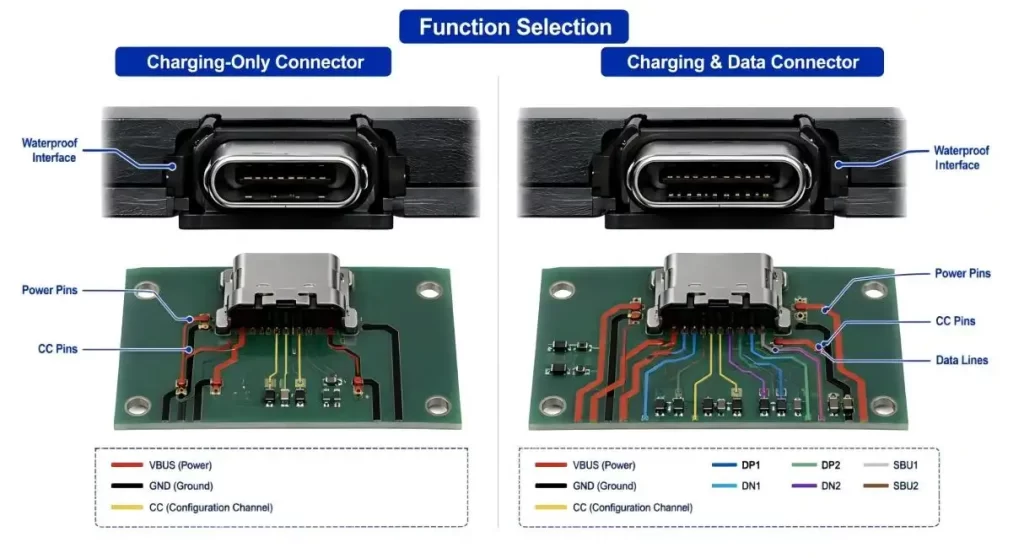
Select a USB function prior to adding the seal
The connector is still responsible for its electrical function.
There are some that just require charging. Others need to access the USB 2.0 data, fast communication, device discovery or power negotiation. It can lead to a more complicated routing and make inspection activities more challenging, without providing any benefit if there's more contacts used than the application needs.
Hanxia has a variety of USB connectors with different USB shapes and functions, and a 6-pin USB-C charging connector is designed for power applications. When choosing a pinout, don't just go with what one expects will be on the enclosure; you need to choose the pinout that will match with the actual power and data requirements.
Don't Ignore Heat in a Sealed Housing
Sealing will help to keep water out, but could also decrease the natural air flow around the connector and PCB.
Heat can be generated at the contact surfaces, at soldered connections, in the cable and power-control components by charging currents. This local temperature rise can be exacerbated by contact resistance, inadequate copper area and/or loose mating connection.
This is just one component of the thermal path, representing the current rating of the connector. Verify PCB Copper, Shell Grounding, Cable Capability, Controller Design and temp in closed enclosure.
When using a high power claim, this should always be verified to the specific connector variant and full system.
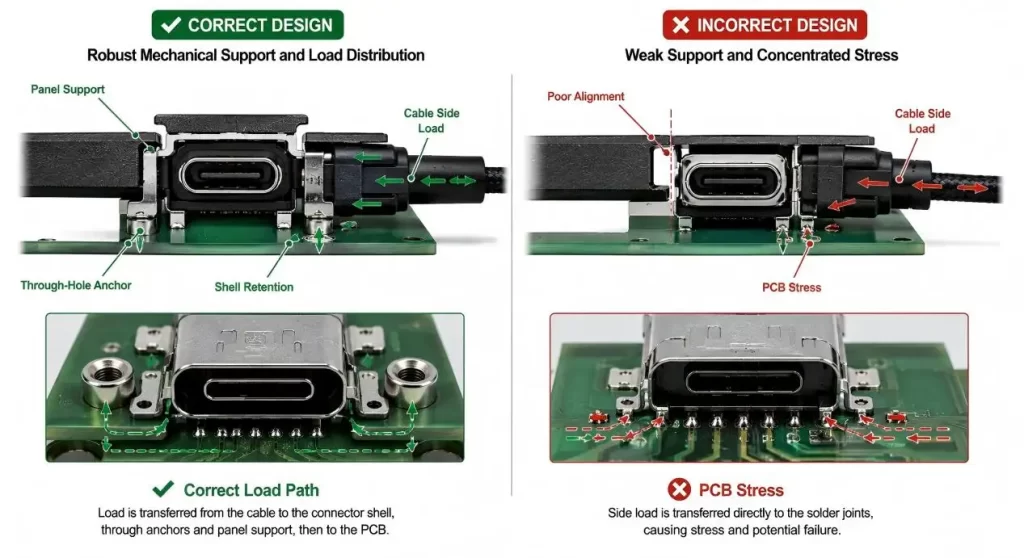
Provide mechanical support to Connector
Although sometimes specified as electrical parts, USB ports are treated like mechanical parts.
Users tug cables side to side and attach them at an angle off the port and leave heavy cables swinging off the port. If these forces are mostly transmitted through small SMT joints, the connector could be loosened without reaching the contact life.
The 16-pin through-hole USB Type-C connector for vibration sensitive equipment features anchor posts and has a shell retention for mechanical support. Selected footprint would need to be double checked with PCB thickness, enclosure alignment, and the anticipated cable load.
The panel opening should lead to the plug so that the connector is not forced to correct misalignment of the panel.
Keep the back of the sunroom dry of condensation!
Moisture does not have to be in contact with the outdoor equipment to cause moisture issues.
During assembly or servicing warm humid air may be introduced and subsequently condensed when the temperature drops. Another path for water is to enter the enclosure through seams, screw threads or along cables and enter the connector.
This means that rear sealing, draining, conformal coating and enclosure ventilation can be equally critical as the front gasket. The design ought to stop any water getting trapped around contacts or exposed PCB pads.
Draining should also be considered in the design of port caps. A cap that retains water on the receptacle can make it a worse condition than an open port facing downwards.
Take into account Corrosion, Dirt and Cleaning Chemicals
Rarely is the only exposure in service laboratory water.
After the visible moisture is evaporated, sweat, salt, mud, oil and detergent can be conductive and/or corrosive. A surface of a gasket can be ruined by fine particles or the plug may not fit down completely.
Verify shell material, contact plating, gasket fit and cleaning directions. Don't imagine that a connector that passed one water test is fit for marine, auto or industrial applications.
The real chemical/compromising situation should be in the component specification.
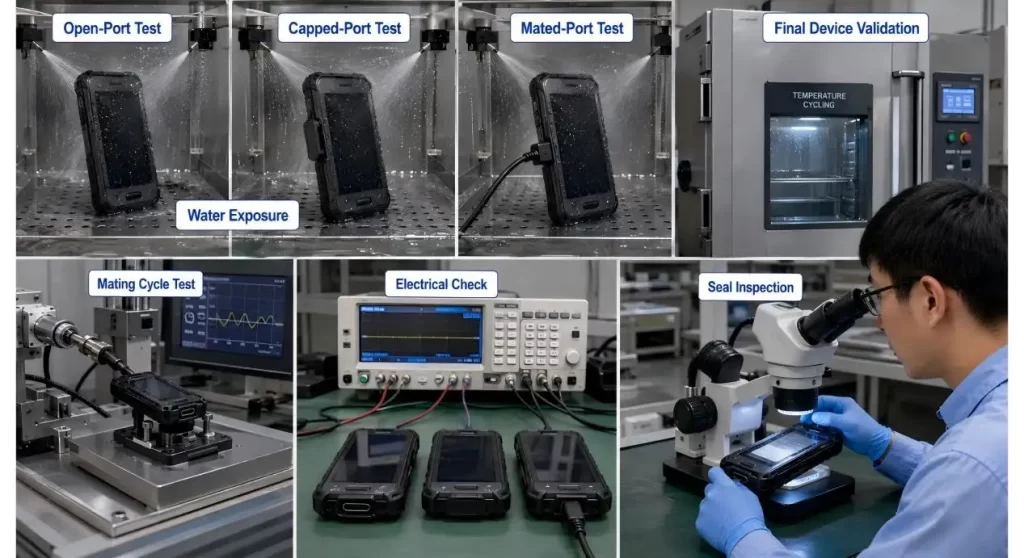
Verify Finished Device
A connector certificate is NOT a substitute for enclosure level testing.
Construct production assemblies with production panels, gaskets, PCB thickness, soldering conditions and fastener torque. Test port in all the required states: Open, capped and mated.
After exposure, check:
- visible ingress;
- Insulation and the stability of the contact;
- Charging and data operation;
- corrosion;
- gasket movement;
- connector retention;
- Damage to PCB and solder-joints.
Carry out the test following mating cycles, cable loading and temperature cycling. Experience has shown that new seals will work better than seals that have been handled and aged.
Conclusion
A waterproof USB connector is not a plug & play waterproofer.
A reliable protection path is achieved through the connector, gasket, enclosure, PCB, cable and user behavior. Specify the wet state first and then indicate the sealing boundary and finally choose the desired power, data and mounting arrangement.
FAQs
Q1. What is a Waterproof USB Connector?
It is a sealing USB receptacle, which under given conditions restricts dust or water from entering the receptacle. The level of protection will vary based on its rating and installation.
Q2. Is the IP67 connector waterproof when plugged in with a cable?
Not automatically. The mated seal can be a function of plug and cable overmould design, boot and enclosure design. Check with supplier as to tested state.
Q3. Is there a waterproof USB-C connector that can be used to transfer data and charge?
Yes but the functions supported will be dependent upon the pinout and system design. Some of them are charging only and others have USB data contacts.
Q4. Is the connector cover over the entire enclosure?
NO. Water can enter from the joints where panels are joined, fasteners, cables or back side of the connector. Enclosure is complete and needs to be separately validated.
Q5. What should be offered up when asking for a sample?
Enter the necessary IP class, test state (open/mated), panel design, USB function, current, PCB mounting and environmental exposure/validation conditions.
