


Tactile Switches Explained: Selection, Design Tips, and How They Work
In This Post
- What are Tactile Switches?
- What’s the Difference Between a Tactile Switch and Push Button Switch?
- What Are the Benefits of Tactile Switches?
- How Do Tactile Switches Work?
- Tactile Switch Specifications
- Types of Tactile Switches
- How to Wire a Tactile Switch
- What Are Common Tactile Switch Applications?
- Conclusion
- Key Takeaways
What are Tactile Switches?
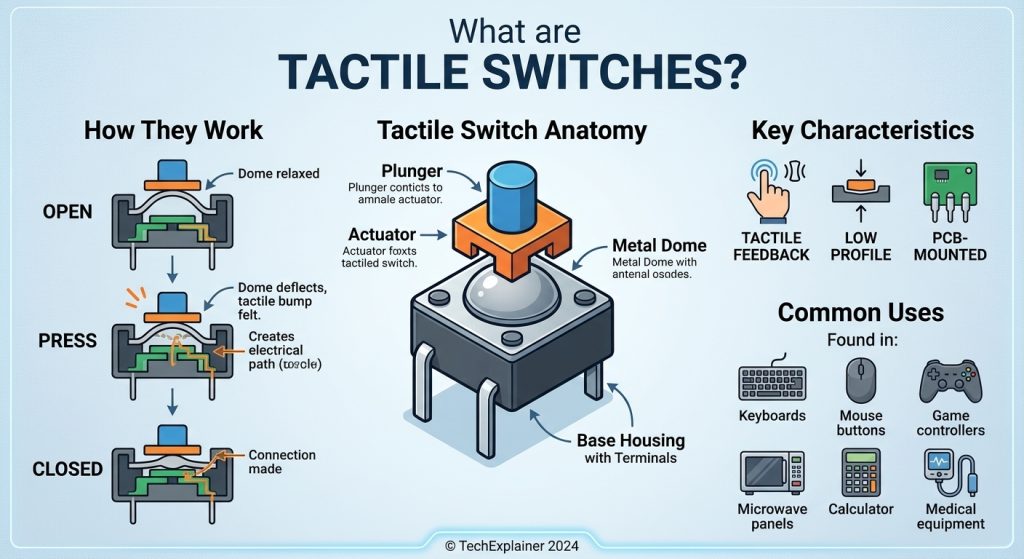
A tactile switch is a commonly used electrical component that activates a circuit when a user applies pressure to its actuator. During activation, it produces a noticeable clicking sound or physical sensation, providing feedback that the switch has been triggered and electrical current is flowing. Once the pressure is released, the circuit is typically disconnected. In simple terms, a tactile switch is a momentary-action device that allows users to recognize its operation through touch. This physical feedback helps confirm that the intended input has been registered. Some tactile switch models also operate in the opposite way, interrupting the current when pressed and restoring it when released. These are known as normally closed tactile switches and are also offered by Same Sky.
Tactile switches originally developed from membrane and screen-printed switch technologies introduced during the early 1980s for keyboards and keypads. These early designs lacked sufficient tactile response and often delivered unsatisfactory performance. The introduction of metal dome mechanisms in the late 1980s significantly improved the technology. Metal domes provided a more noticeable tactile response, improved actuation strength, and increased durability. Today, tactile switches serve as essential input components in a wide range of commercial and consumer electronic products.
Interested in learning more about switches? Explore these additional blog topics:
- Fundamentals of Switches: A Guide to Types, Uses, and Selection
- Slide Switches Selection Guide: From Form Factor to Function
- What Are DIP Switches? A Guide to Types, Functions, and Uses
- Why Rotary DIP Switches Matter: Reliable Configuration for Modern Electronics
You can also watch the How Tactile Switches Work or DIP Switches 101 videos.
What’s the Difference Between a Tactile Switch and Push Button Switch?
Tactile switches are sometimes commonly called push button switches, which can create confusion between the two types. A push button switch is generally designed to control the flow of current when its actuator is pressed through a defined travel distance. Depending on its operating mechanism, the circuit may remain in its selected state until the button is pressed again. Push button switches can be installed on control panels or mounted directly onto printed circuit boards (PCBs). For more information, refer to the Push Button Switches blog.
In comparison, a tactile switch typically completes an electrical circuit while its actuator is pressed and held. When the user releases the actuator, the circuit returns to its original state. Some models operate in the reverse manner. These switches have a short actuator travel and are classified as momentary-action devices. Although certain push button switches also feature momentary operation, all tactile switches are designed for this function. Tactile switches are generally smaller than push button switches and usually have lower voltage and current ratings. They also provide audible or physical feedback and are primarily designed for direct PCB mounting.
What Are the Benefits of Tactile Switches?
Tactile switches provide several advantages that can improve the functionality and overall user experience of electronic products. One of their main benefits is momentary circuit operation. Electrical current flows when the switch is pressed and stops when it is released, or the reverse in normally closed models. This functionality supports quick and efficient data entry, such as typing on a computer keyboard, and allows users to maintain input for as long as needed in applications like motor control keypads.
Another major advantage is the physical and audible feedback they provide. The clicking sensation and sound help users recognize that the switch has been activated and that the electrical signal has been sent. In applications such as computer keyboards, this feedback creates a more comfortable typing experience and helps users identify missed or unregistered keystrokes.
Tactile switches are also designed for relatively low-power and low-current applications. Their electrical characteristics make them suitable for low-voltage electronic systems and can help reduce manufacturing costs. Operating at lower voltage levels can also minimize electrical arcing at the contact points.
Additionally, tactile switches generally contain fewer moving parts than many other mechanical switch designs. This simplified construction can contribute to a longer operating life and reliable performance. Their direct PCB mounting capability reduces the need for additional mechanical components and can make them a cost-effective choice for electronic product designs.
How Do Tactile Switches Work?
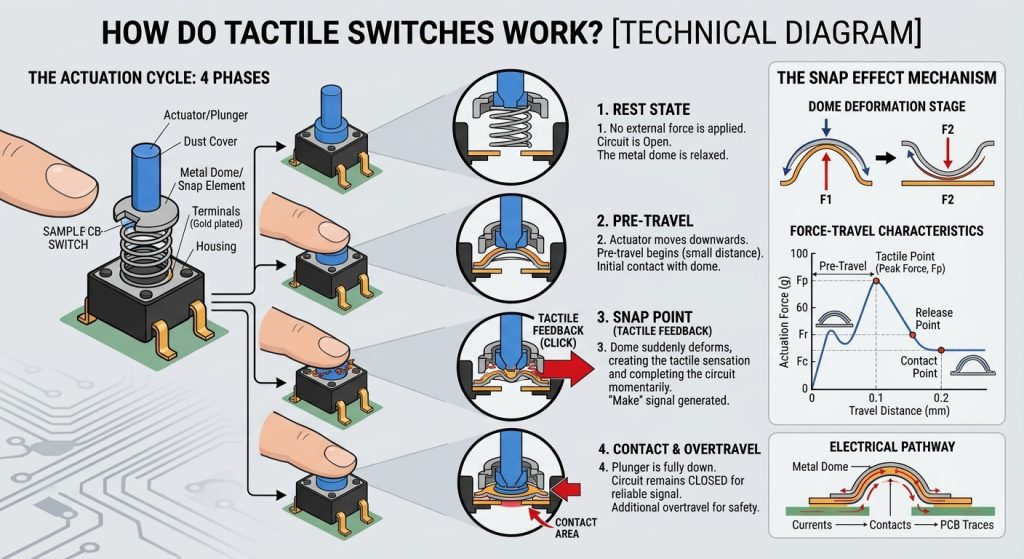
Tactile switches feature a straightforward mechanical design that uses a small number of components to perform their switching function. A typical tactile switch consists of four primary parts. The largest component is the molded resin base (4), which houses the terminals and electrical contacts used to connect the switch to the printed circuit board (PCB).
A contact dome (3) is positioned inside the base. This dome has an arched structure that bends or changes shape when pressure is applied. The movement generates the characteristic clicking sound and tactile sensation associated with the switch. When the dome flexes, it connects two fixed contacts inside the base, allowing electrical current to flow through the circuit. Once the pressure is removed, the dome returns to its original shape and breaks the connection. Depending on the required tactile response and sound level, contact domes can be manufactured from metal or other materials.
The plunger (2) is placed directly above the contact dome. When a user presses the plunger, it transfers force to the dome, causing it to flex and activate the switch. Plungers may be constructed from metal, rubber, or other materials. Their design can include a flat surface or a raised actuator, depending on the product's requirements. The materials used for both the plunger and contact dome play an important role in determining the switch's clicking sound and tactile feel.
The cover (1) sits above the plunger and protects the internal components of the switch. It is commonly manufactured from metal or other suitable materials based on the intended application and required level of protection. Some cover designs also incorporate a grounding terminal to help protect the switch against electrostatic discharge.
Tactile Switch Specifications
Tactile switches are available with a range of technical specifications that help engineers determine their suitability for different applications. Important specifications include:
Voltage Rating: The maximum voltage a switch can safely handle while its contacts are open or closed. Tactile switches generally operate at relatively low voltage levels.
Current Rating: The maximum amount of electrical current, measured in amperes, that a switch can carry without sustaining damage.
Activation Force: Also referred to as operating force, this specification indicates the pressure required to move the switch actuator. It is usually measured in gram-force (gf).
Deflection: Also known as actuator travel, deflection represents the total distance the actuator moves when the switch is pressed.
Contact Force: The amount of force, generally measured in grams, required for the switch contacts to connect and allow electrical current to flow.
Actuator Height: The measurement of how far the actuator extends above the main body of the switch.
Lifecycle Range: The estimated number of operating cycles a switch can complete under normal working conditions.
Temperature Range: The minimum and maximum temperatures at which a switch is expected to function within its specified performance limits.
Mounting Style: The installation method used to attach the switch to a PCB. Common mounting options include through-hole and surface-mount technologies.
IP Rating: An international classification that indicates the level of protection a switch provides against the entry of dust and liquids.
Examples of common tactile switch actuator heights
Choosing a suitable tactile switch involves more than simply comparing the specifications listed on a datasheet. The physical feel and clicking sound of a switch can influence how users perceive the quality of an electronic product. These characteristics are not always easy to measure numerically. The required activation force and tactile feedback should be selected according to the intended application, whether it is a consumer electronic device or an industrial product.
Testing a switch in a working prototype is often an effective way to determine whether its characteristics meet the application's requirements. For instance, an automotive control switch may need a higher actuation force to prevent accidental activation caused by vehicle vibrations. On the other hand, a switch used in a printer or gaming device may require a lighter and more responsive touch. Regardless of the application, the selected switch should provide consistent and dependable performance throughout its expected operating life.
Types of Tactile Switches
Tactile switches are generally divided into two primary categories: standard (open) switches and sealed switches. Standard tactile switches do not have a protective seal against external elements such as dust, gases, or moisture. Sealed tactile switches, in contrast, include protective mechanical features that help prevent dust and water from entering their internal components. This makes them more suitable for demanding environments.
Some of the different types of tactile switches that are available include:
- Round/Square/Rectangular
- Flush
- Illuminated
- Miniature
- Micro
- Right Angle
- Long Stroke
- 5-Way
- Switch Arrays & Keypads
How to Wire a Tactile Switch
Most tactile switches feature four pins that are internally arranged into two electrically connected pairs. The additional pins provide mechanical stability when the switch is installed on a printed circuit board. Although only two electrical connections are generally required to operate the switch, using the available pins appropriately can improve mounting stability. It is important to remember that the pins within each pair are internally connected.
Tactile switches are also manufactured with two-pin configurations for simpler electrical connections. Additionally, some five-pin tactile switch models are designed to support compact joystick-style control functions, making them useful for applications that require multiple directional inputs in a small space.
Typical tactile switch pin configuration
What Are Common Tactile Switch Applications?
Tactile switches are widely used in consumer electronics and industrial equipment because of their compact dimensions, low-profile construction, and dependable operating life. Their ability to provide clear user feedback makes them suitable for a variety of input and control functions.
Common applications of tactile switches include:
- Keyboards & Keypads
- Remote Controls
- Game Controllers
- Phones
- Toys
- Musical Instruments
- Notebook Computers
- Appliances
- Security Electronics
- Industrial Controls
- Electrical & Electronic Instruments
- Portable Equipment
- Medical Equipment
In addition to these established applications, tactile switches are increasingly being incorporated into newer technologies. Their compact size, lightweight construction, and durability make them useful in wearable devices, smart body armor, and body cameras.
Conclusion
Tactile switches are a practical solution for electronic products that require low-power, momentary switching or data input with clear physical and audible feedback. Their compact design, reliable operation, and efficient performance make them suitable for a wide range of consumer and industrial applications. Same Sky provides tactile switch options with compact package sizes, various actuator heights, and multiple configuration choices to support different product design requirements.
Key Takeaways
- Tactile switches are compact, momentary-action components that generate audible and physical feedback when activated.
- These switches are commonly used in consumer electronics, automotive systems, medical devices, and industrial equipment.
- Their low-profile construction and accurate actuation make them suitable for space-limited PCB designs.
- Tactile feedback helps users confirm input signals, improving interface usability and reliability in human-machine interactions.
- Common tactile switch configurations include standard, sealed, surface-mount (SMT), and through-hole designs.
- Important selection criteria include actuation force, actuator height, travel distance, terminal configuration, operating lifespan, and IP rating.
- Engineers choose tactile switches for their affordability, straightforward integration, and long mechanical lifespan in low-current applications.
