





How to Choose a DIP Switch for Router Settings
Network instability is often blamed on software bugs or interference, but experienced hardware engineers know the truth lies deeper in the physical layer. A failing component—specifically a degraded DIP switch—can silently reset baud rates, scramble device IDs, or toggle between RS-232 and RS-485 modes without warning.
When a router’s configuration depends on physical binary states, the reliability of that switch is paramount. It isn't just a plastic button; it is a logic gate that must hold a specific state for years, often in less-than-ideal environments.
At HX-Switch, we understand that manufacturing precision dictates network uptime. Whether you are designing industrial gateways or sourcing components for maintenance, selecting the right DIP switch requires looking beyond the basic pin count. This guide explores the mechanical and electrical specifications necessary to ensure your router settings remain locked in.
The Role of DIP Switches in Router Hardware
While modern consumer routers rely heavily on web interfaces (GUIs) for configuration, industrial and commercial networking gear depends on hardware-level configuration. DIP (Dual In-line Package) switches provide a physical override that software cannot corrupt.
In networking hardware, these switches typically handle Low-Level Logic Signals. They are not carrying power to motors; they are carrying binary code (1s and 0s) to the router’s controller board or Microcontroller Unit (MCU).
Common Router Functions Controlled by DIP Switches:
- Transmission Speed: Setting Baud rates (e.g., 9600 vs. 115200 bps).
- Protocol Selection: Toggling between RS-485 (2-wire), RS-422, or RS-232 communication standards.
- Device Addressing: Hard-coding a unique MAC or IP address offset using binary positions.
- Termination: Engaging 120Ω termination resistors to prevent signal reflection in long cable runs.
The Bottom Line: If the switch contact fails or creates high resistance due to oxidation, the router reads a logic "0" as a "1" (or "floating"), causing immediate communication failure.
Critical Factor 1: Contact Material (Gold vs. Silver)
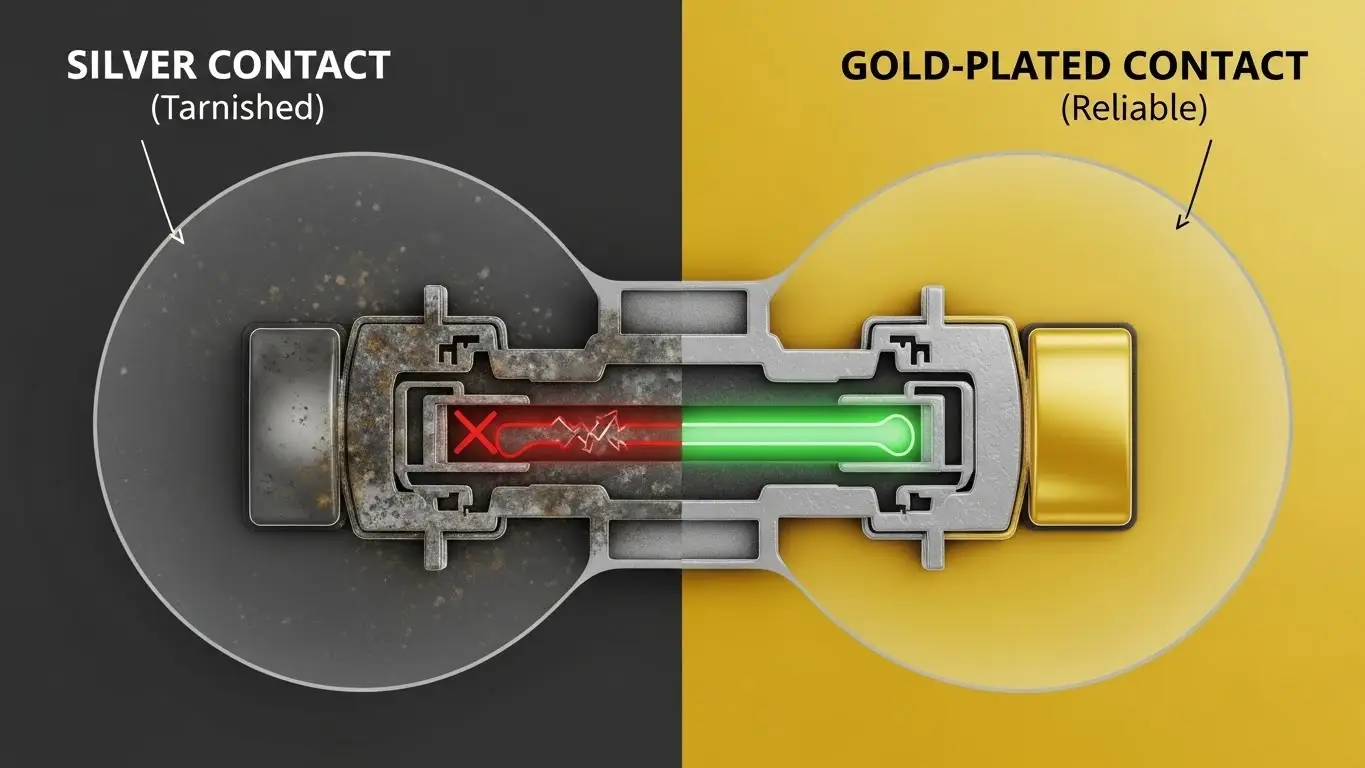
This is the single most important specification when choosing a DIP switch for router settings, yet it is often overlooked.
Router logic circuits operate at very low voltages (typically 3.3V or 5V) and extremely low currents (micro-amps). In the switch industry, this is known as a "Dry Circuit."
Why Silver Fails in Routers
Silver contacts are excellent for high-current applications because of their thermal conductivity. However, silver is prone to sulfuration (tarnishing). In a high-current switch, the arc of electricity burns off this tarnish. In a router's low-current "dry circuit," there is no arc. The tarnish builds up, creating an insulating layer that blocks the signal.
The Gold Standard for Logic Reliability
For router settings, you must specify Gold-Plated Contacts. Gold is a noble metal that resists corrosion and oxidation.
Engineering Recommendation:
- Contact Resistance: Look for a spec of < 50mΩ (milliohms).
- Plating: For industrial routers, a gold plating thickness over nickel is standard to ensure the "ON" signal is clean and noise-free for the lifespan of the device.
Critical Factor 2: Actuation Type and Form Factor
The physical design of the switch should match the router's enclosure design and the intended frequency of interaction.
Slide Type (Standard)
The classic flat DIP switch. These are low-profile and cost-effective.
- Best For: Internal settings that are configured once at the factory or during initial installation and rarely touched again.
- Design Note: The actuators are flush or slightly recessed, preventing accidental switching if the router is slid into a tight rack space.
Piano Type (Side-Actuated)
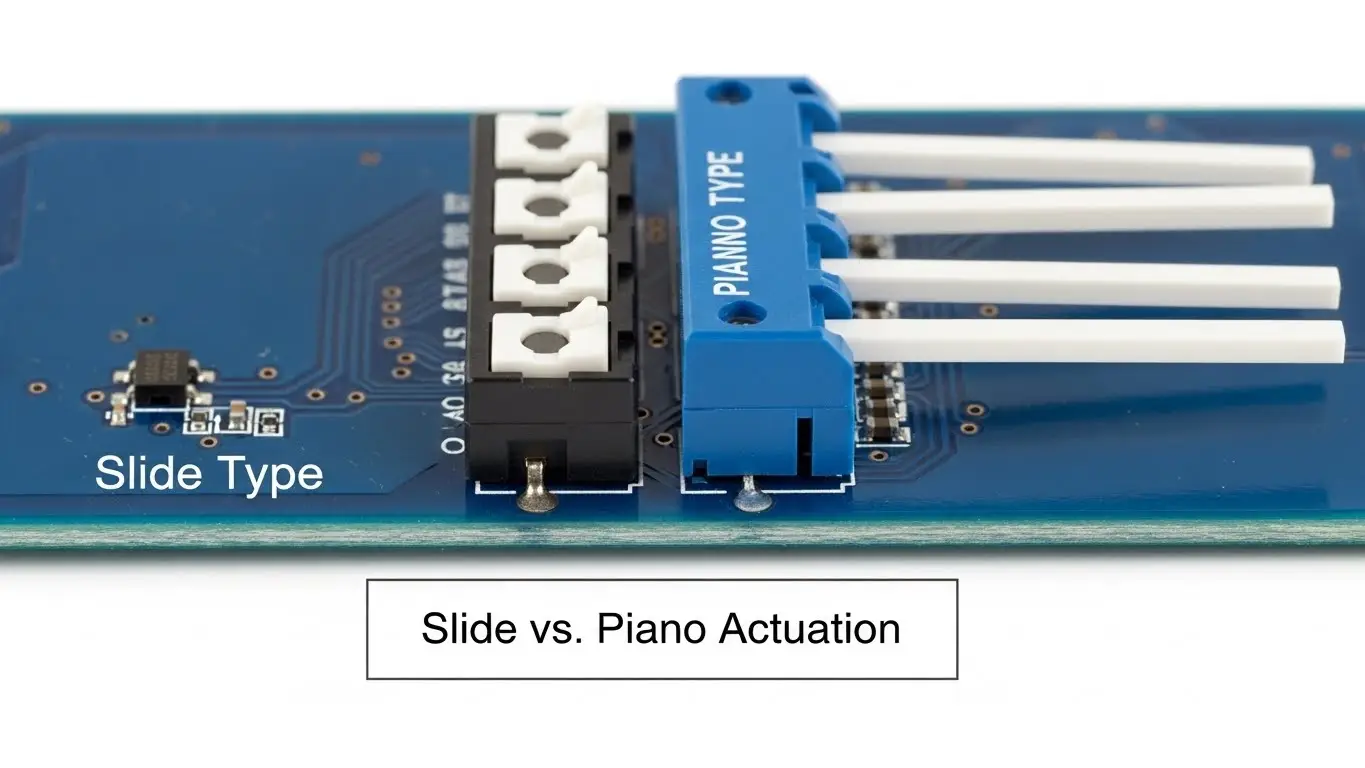
As the name suggests, the actuators stick out like piano keys.
- Best For: Edge-mounted PCB designs. If the router allows users to change settings through a cutout in the side of the metal case, the Piano type is mandatory for accessibility.
- User Experience: They provide better visual feedback on the ON/OFF state compared to slide switches.
Rotary DIP Switches
Instead of multiple sliders, this uses a single rotating dial.
- Best For: Address/ID settings. If a technician needs to set a router ID to "Unit 4," turning a dial to "4" is significantly faster and less error-prone than calculating the binary equivalent (0100) on a 4-pole slider.
Critical Factor 3: Environmental Sealing and Assembly
Manufacturing routers involves harsh processes, specifically soldering. If flux or cleaning solvents enter the switch housing during assembly, the contact mechanism can be compromised before the router even leaves the factory.
The Importance of "Top Tape Seal"
When sourcing switches, check for the "Tape Sealed" option. This is a thin vacuum-sealed film covering the actuators.
- Process Safety: It prevents flux and conformal coating from seeping inside during wave soldering or board washing.
- Removal: The tape is peeled off after the manufacturing wash process is complete.
For routers installed in dusty server closets or industrial factory floors—similar to environments where you would need robust industrial tactile switches—consider maintaining a high IP rating (Ingress Protection). While the switch itself isn't usually IP67, the internal contacts should be enclosed to prevent dust ingress from interrupting the logic connection.
Installation: Through-Hole (THT) vs. Surface Mount (SMT)
The choice between THT and SMT DIP switches depends on your manufacturing assembly line and the mechanical stress the component will face.
| Feature | Through-Hole (THT) | Surface Mount (SMT) |
| Mechanical Strength | High. Anchored through the PCB. | Moderate. Soldered to pads. |
| Assembly Process | Wave Soldering (Manual/Auto). | Reflow Soldering (Automated). |
| Router Application | Heavy-duty industrial routers where vibration is a concern. | Consumer Wi-Fi routers and high-volume electronics. |
| Heat Resistance | Standard thermoplastics. | Requires High-Temp polymers (e.g., PPS/Nylon 9T) to survive reflow ovens. |
Common Mistakes to Avoid
In our years of manufacturing precision switches at HX-Switch, we see engineers make the same sourcing errors that lead to field failures.
1. Ignoring the "Wiping" Mechanism
Good DIP switches utilize a "self-cleaning" wiping contact design. As you slide the actuator, the contact slides across the surface, mechanically scrubbing off any microscopic dust or oxide layer. This ensures a consistent connection, a principle that is equally important when looking for the best long-lifespan switches for other interface panels. Ensure your datasheet mentions high-contact pressure or wiping action.
2. Overlooking Actuation Force
If the switch moves too easily (low operating force), a technician brushing against the router with a cable can accidentally flip a bit. For critical network gear, a higher actuation force (requiring a deliberate push with a tool) is a safety feature, not a defect.
3. Confusing Pitch Sizes
Standard networking gear uses a 2.54mm pitch (distance between pins). However, developers must be careful when they select switches for IoT devices, as compact IoT gateways are increasingly moving to 1.27mm (Half-Pitch) switches. Always verify the PCB layout footprint before ordering.
Conclusion
The DIP switch is the gatekeeper of your router’s configuration. While it may seem like a minor component in the Bill of Materials, its failure results in disproportionate downtime and troubleshooting costs.
To guarantee network stability:
- Prioritize Gold Plating to handle low-energy logic signals reliably.
- Select Piano style for edge-access or Rotary style for easy ID addressing.
- Ensure Tape Sealing is used during the manufacturing wash process.
At HX-Switch, we manufacture switches designed to meet these rigorous industrial standards. When your network requires hardware-level reliability, ensure your components are built to handle the task.
Frequently Asked Questions (FAQ)
The industry standard for most networking hardware is 2.54mm (0.100 inch) pitch. This standard spacing allows for easy manual operation and compatibility with standard breadboards and PCB layouts. However, compact devices may use 1.27mm pitch.
Gold is resistant to oxidation and corrosion. Since router settings rely on low-voltage/low-current signals (dry circuits), there is no electrical arc to clean off the tarnish that forms on silver. Gold ensures a consistent connection without signal degradation over time.
Technically yes, but Rotary switches are best suited for numerical values like "Device ID." Baud rates and protocol modes are binary choices (ON/OFF), making standard 4-position or 8-position Slide/Piano DIP switches the more logical and cost-effective choice.
Raised actuators are easier to move with a finger but are prone to accidental switching. Recessed actuators sit flush with the housing and usually require a small tool or pen tip to move, offering better security against accidental resets in active server environments.
Yes, but only after the soldering and board cleaning process is complete. The tape is there to protect the internal contacts from flux and washing solvents. Once the PCB is assembled and dry, peel the tape to allow the switch actuators to move freely.
