





Why Your Tact Switch Isn’t Working
If your tactile switch isn't working, the most likely culprit is contact oxidation or internal contamination (dust and debris) preventing electrical continuity. Over time, the silver plating inside the switch tarnishes, or the metal dome fatigues and loses its "snap," resulting in a failure to close the circuit when pressed. Other common causes include heat damage from soldering, which creates internal plastic deformation, or moisture ingress leading to corrosion. Before replacing the component, simple testing with a multimeter can confirm if the issue is the switch itself or a problem elsewhere in the circuit board.
H2: The Mechanics Behind Tact Switch Failures
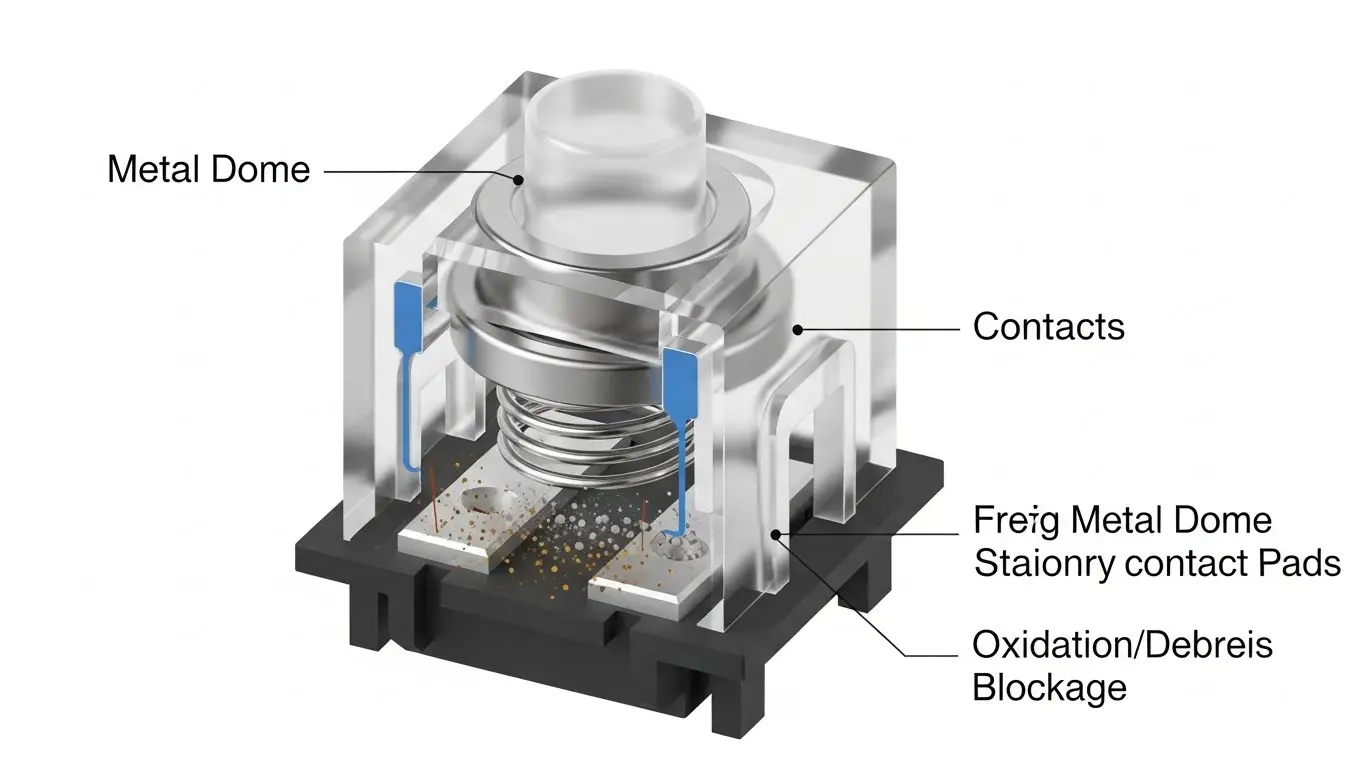
To understand why your switch failed, you need to understand how it functions. A tactile switch works via a metal dome that collapses when pressed, making contact with two conductive pads.
H3: Contact Oxidation and Contamination
This is the number one killer of unsealed switches. Tact switches are open to the air unless they have a high IP rating (Ingress Protection).
- Dust: Small particles get trapped under the dome, insulating the contacts.
- Oxidation: If the switch is used in humid environments, the silver contacts can oxidize, increasing electrical resistance until the signal can no longer pass through.
H3: Metal Dome Fatigue
Every switch has a life cycle rating (e.g., 100,000 to 1 million cycles). Every time you press the button, you are physically deforming a metal dome. Eventually, the metal suffers from stress fractures or simply loses its elasticity. You might feel the button typically "click," but the metal doesn't push down hard enough to complete the circuit.
H3: Heat Damage During Assembly
If this is a new electronic project, the issue might be installation error. Excessive heat during the soldering process can melt the internal plastic housing. This shifts the pin positions slightly, preventing the metal dome from making proper contact.
H2: How do I test if a tact switch is bad?
The quickest way to test a tact switch is using a digital multimeter set to "Continuity" mode.
If you suspect failure, don't guess—measure. Here is the step-by-step process:
- Disconnect Power: Ensure the device is turned off and unplugged.
- Set Multimeter: Turn the dial to the continuity setting (usually indicated by a sound wave or diode symbol).
- Probe the Pins: Touch the probes to the switch terminals. Most tact switches have 4 pins; usually, pins on the same side are internally connected, so you need to test across the switch body.
- Press the Button: While holding the probes, press the actuator.
- Listen for the Beep: If the multimeter beeps (or reads near 0 ohms), the switch is working. If it stays at "OL" (Open Loop) while pressed, the switch is dead.
For more complex scenarios where the switch appears to work but the device doesn't respond, you may need to look deeper into the PCB traces. You can read our guide on advanced troubleshooting and repair for detailed diagnostic steps.
H2: Can a tactile switch be repaired?
Generally, tactile switches are designed to be replaced rather than repaired, but cleaning is possible in some cases.
Because these components are inexpensive and sealed shut, opening them often destroys them. However, if you are in a bind:
- Contact Cleaner: You can try spraying a small amount of electronic contact cleaner (like DeoxIT) into the gap around the actuator. Rapidly press the switch 20-30 times to work the cleaner in and break up oxidation.
- Isopropyl Alcohol: If contact cleaner isn't available, high-percentage (90%+) isopropyl alcohol can sometimes flush out debris.
Warning: Never use oil-based lubricants (like standard WD-40) as they attract dust and leave a residue that will ruin the switch permanently.
H2: Comparing Sealed vs. Unsealed Switch Failures
Choosing the right switch for the environment prevents future failures. Here is how sealed and unsealed switches differ in failure modes.
| Feature | Standard Tact Switch (Unsealed) | Sealed Tact Switch (IP67+) |
| Primary Failure Mode | Dust ingress and Oxidation | Physical Dome Fatigue |
| Moisture Resistance | Low (Susceptible to corrosion) | High (Waterproof) |
| Best Environment | Indoor, Consumer Electronics | Outdoor, Automotive, Industrial |
| Washable? | No (Solvents can enter) | Yes (Safe for PCB washing) |
H2: Why does my switch work intermittently?
Intermittent failure is usually caused by "Switch Bounce" or high contact resistance.
H3: Understanding Contact Bounce
When you press a switch, the metal contacts don't just close once; they bounce apart microscopically before settling. If the contacts are dirty, this bouncing effect is exaggerated. The microcontroller reading the switch might get confused, registering multiple clicks or ignoring the input entirely because the signal is too "noisy."
H3: Floating Pins
Sometimes the switch is fine, but the solder joint connects it to the board is cracked (a "cold solder joint"). Wiggling the switch might make it work temporarily. This requires reflowing the solder to fix.
Frequently Asked Questions
A: No. Standard WD-40 leaves an oily residue that attracts dust and ruins the electrical contacts. Only use specialized "Electrical Contact Cleaner" or high-purity Isopropyl Alcohol.
A: It depends on the rating. Standard consumer switches last between 100,000 to 500,000 cycles. Heavy-duty or premium switches can last upwards of 1 million to 10 million cycles.
A: This is a phenomenon called "bouncing" or chatter. It happens when the internal contacts are worn or dirty, causing the signal to fluctuate rapidly. Software debouncing or replacing the switch usually fixes this.
A: No. While the 6x6mm size is the most common, they come in various dimensions (3x4mm, 12x12mm) and different actuator heights. You must measure the old switch before buying a replacement.
Key Takeaways
- Oxidation is the main cause: Most failures are due to dirty or corroded contacts inside the switch mechanism.
- Test with Continuity: Use a multimeter to verify if the switch is closing the electrical circuit.
- Replace, don't repair: Tact switches are cheap; trying to open and fix them is rarely worth the effort compared to soldering in a new one.
- Check the Solder: Ensure the failure isn't actually a cracked solder joint on the PCB.
Conclusion
A non-functional tact switch is usually a simple mechanical failure rather than a complex electronic mystery. By identifying whether the issue is contamination, heat damage, or simple wear and tear, you can decide whether to attempt a quick cleaning or swap the component entirely.
If you have confirmed the switch is bad and need to remove it, ensure you have the right tools to avoid damaging the pads. For more help on what to do when standard fixes don't work, refer to our guide on advanced troubleshooting and repair.
