





When to Use Touch Sensors vs Tactile Switches
You should use touch sensors (capacitive touch) when your priority is aesthetics, waterproofing, and longevity, as they have no moving parts and allow for completely sealed enclosures. Use tactile switches when user safety, precise feedback, or low cost are paramount.
The decision ultimately comes down to the "Eyes-Free" test: If the user needs to operate the device without looking at it (like adjusting a car radio while driving), a tactile switch with physical feedback is superior. If the device requires a sleek, hygienic surface that is easy to clean (like a medical panel or microwave), a touch sensor is the better choice.
What is the Main Difference Between Touch and Tactile?
The core difference lies in the mechanism of actuation: Mechanical vs. Solid State.
Tactile Switches (The Mechanical Standard)
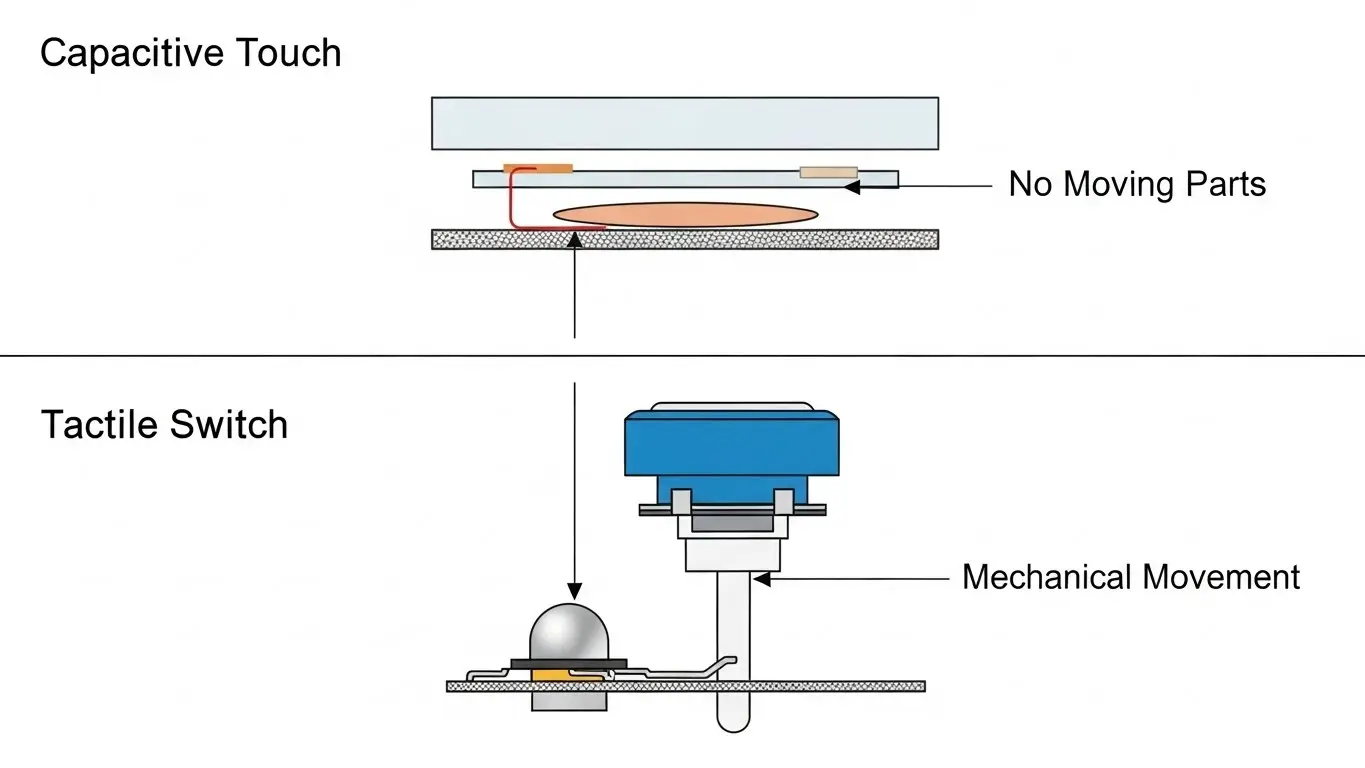
A tactile switch uses a metal dome or internal contact that physically collapses when pressed. This creates a "break-over" sensation—that satisfying click that confirms the input. They are simple to design but introduce a physical hole in your device housing, which can be a weak point for water ingress.
If you are trying to fit these mechanical components into a tiny footprint, you might face significant design challenges. We have a detailed guide on alternatives to tact switches in compact devices that explores how to minimize profile height using technologies like metal domes.
Touch Sensors (The Solid-State Upgrade)
Touch sensors (usually capacitive) detect the change in electrical capacitance when a conductive object (like a finger) approaches the PCB. There are no moving parts. This allows you to place the sensor behind a solid sheet of glass, plastic, or acrylic, creating a seamless and waterproof surface.
Why Is Tactile Feedback Important for Safety?
Tactile feedback is critical for safety because it confirms an action without requiring visual confirmation.
In high-stakes environments—industrial machinery, automotive dashboards, or emergency stops—the user cannot afford to look down at a screen. A physical button provides "haptic certainty." You know you pressed it because you felt the snap.
While touch screens can simulate this with vibration motors (haptics), it adds complexity and cost. If your application involves critical control adjustments, you might even consider other physical interfaces. For example, check our comparison on when to use rotary switches vs. DIP switches to see how rotary dials offer superior control for specific industrial settings.
Are Touch Sensors More Durable Than Switches?
Yes, touch sensors are significantly more durable than tactile switches in terms of cycle life.
Because a touch sensor is just a copper pad on a circuit board, it effectively has an infinite lifespan. It does not suffer from metal fatigue or contact oxidation.
A standard tactile switch typically has a lifespan of 100,000 to 1 million cycles. Eventually, the spring mechanism will fail. If you are looking to replace failing mechanical buttons with more robust options, read our analysis on the best alternatives to micro tact switches for a breakdown of longevity improvements.
The Environmental Factor
Touch sensors are king in harsh environments. Since they can be sealed behind a contiguous panel, they are immune to dust, moisture, and grease. This is why they are standard in modern kitchen appliances and medical devices.
Speaking of rugged environments, this shift toward sealed, solid-state reliability is also happening in network infrastructure. For a broader look at rugged connectivity, see our article on industrial Ethernet switch alternatives.
How Does Cost and Complexity Compare?
Tactile switches are cheaper to buy, but touch sensors can be cheaper to manufacture at scale.
- Tactile Switch: Low component cost ($0.05 - $0.20), but requires assembly labor, casing cutouts, and sealing gaskets.
- Touch Sensor: Zero component cost (it's just a PCB trace), but requires a more expensive microcontroller (MCU) and software tuning.
The Hidden Cost of Configuration
Beyond the user interface, consider how you configure your device internally. Many engineers still use bulky switches for internal settings. You can save money and board space by moving these functions to software or lower-profile hardware. Learn more in our guide to the best alternatives to DIP switches.
Comparison Table: Touch vs. Tactile
| Feature | Tactile Switch | Touch Sensor (Capacitive) |
| Feedback | Physical Click (High) | Visual/Audio only (None) |
| Lifespan | Finite (100k - 1M cycles) | Infinite (Solid State) |
| Waterproofing | Difficult (Requires gaskets) | Excellent (Sealed panel) |
| Glove Use | Excellent | Poor (Requires special tuning) |
| Aesthetics | Utilitarian | Sleek / Modern |
| Cost | Low BOM, Higher Assembly | High BOM, Lower Assembly |
Frequently Asked Questions
Generally, yes. A mechanical switch is a passive component that draws zero power until pressed. A touch sensor requires an active microcontroller to constantly "scan" for a finger, which consumes battery life. However, modern low-power sleep modes have minimized this difference.
Water droplets can trigger false touches on standard capacitive sensors because water conducts electricity like a finger. Advanced controllers use "water rejection" algorithms or mutual capacitance technology to ignore stationary droplets and only detect moving fingers.
Capacitive sensors rely on the body's natural electrical conductivity. Thick gloves act as insulators, blocking the signal. To work with gloves, the sensor sensitivity must be tuned very high, which increases the risk of false triggers from noise.
Touch sensors are generally preferred for medical devices because they allow for a flat, sealed control panel that is easy to wipe down and sterilize without damaging the electronics.
Key Takeaways
- Choose Tactile Switches if your user wears heavy gloves, needs "eyes-free" operation, or if the device is battery-critical.
- Choose Touch Sensors for products that need to look modern, require waterproofing (IP67+), or need to be easily sterilized.
- Consider Hybrid Designs: Many successful products use touch for general navigation but keep a physical tactile button for the power or "Home" function.
- Don't Forget Feedback: If you go with touch, add an LED blink or a beep to confirm the press, otherwise users will press too hard.
Conclusion
The choice between touch sensors and tactile switches is a trade-off between form and function. Touch sensors win on form—they are sleek, durable, and waterproof. Tactile switches win on function—they provide unbeatable feedback and reliability in difficult conditions. Analyze your user's environment first; if they are wearing gloves in the rain, give them a click. If they are in a sterile lab, give them a touch.
