





Tactile Switches for Wearable Devices: Engineering the Perfect "Click"
In the high-stakes world of wearable technology, a single millimeter can be the difference between a sleek, best-selling smartwatch and a bulky, forgotten prototype. While touchscreens dominate the visual interface, tactile switches remain the unsung heroes of user interaction. Whether it’s stopping a workout with sweaty hands or triggering an emergency SOS without looking, the physical reliability of a mechanical switch is irreplaceable.
This guide explores the engineering nuances of integrating tactile switches into the constrained architectures of wearables, referencing the latest industry standards and 2025 market trends.
Why Are Tactile Switches Preferred Over Capacitive Touch?
Tactile switches provide unmistakable haptic confirmation that capacitive sensors cannot replicate, ensuring command registration in wet, active, or gloved environments.
While capacitive touch is elegant, it suffers from "ghost touches" in rain or sweat—a fatal flaw for a fitness tracker. A mechanical tactile switch offers:
- Zero Power Consumption in Standby: unlike capacitive sensors that constantly "poll" for touch, draining battery.
- Positive Feedback: A sharp "snap" (haptic ratio >50%) confirms the action to the user’s brain instantly, reducing the need for visual verification.
- Safety Criticality: For medical wearables, a physical button is often mandatory for power and reset functions to prevent accidental shut-offs.
What Are the Key Design Challenges for Wearable Switches?
Designing for wearables is an exercise in compromise. You need rugged durability in a package smaller than a grain of rice.
1. Ultra-Miniature Footprints
Standard 6x6mm switches are giants in this space. Wearables demand ultra-miniature SMT switches, often in 3.0mm x 2.0mm or even 1.6mm x 1.6mm footprints. The challenge is maintaining a life cycle of 500,000+ actuations without the metal dome fatiguing in such a small housing.
2. The "Swim-Proof" Standard (IP68)
A "water-resistant" rating is no longer enough. Modern users expect to swim with their devices. This requires switches with IP68 ratings, utilizing advanced laser-welded membranes or internal silicone seals that withstand immersion beyond 1.5 meters.
- Insight: See our Technical Switch Application Notes for deeper data on IP rating testing protocols.
3. Integration on Flexible Printed Circuits (FPC)
Most wearable PCBA designs are not flat; they are curved to fit the wrist or body. Mounting a rigid switch on a flexible circuit introduces mechanical stress.
- The "Phantom Click" Risk: Without proper stiffeners, flexing the wrist can warp the FPC, causing the switch to actuate inadvertently or, worse, popping the solder joints.
Market Trends: The Haptic Shift
As devices shrink, the "Side-Actuated" switch is becoming the dominant form factor. By mounting on the edge of the PCB, these switches allow buttons to be placed on the side of a watch case while keeping the main circuit board flat, saving crucial vertical stack-up height.
Technical Deep Dive: Mounting on Flex Circuits
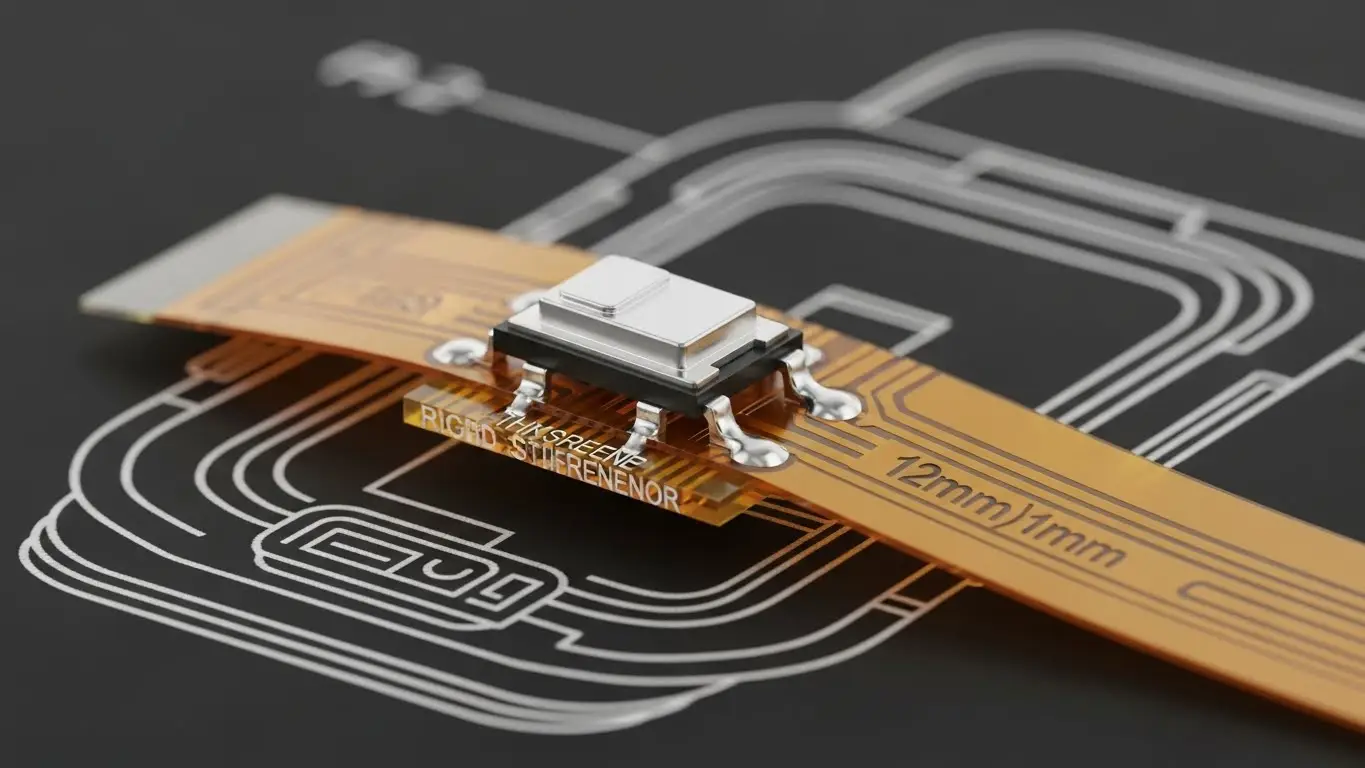
Successful integration requires specific manufacturing techniques to prevent joint failure.
When mounting a rigid component (the switch) onto a flexible substrate (the circuit), you must create a "rigid island."
- Stiffener Application: A layer of FR4 or Polyimide must be bonded to the back of the flex circuit directly under the switch. This prevents the switch from peeling off when pressed.
- Laser Soldering: unlike wave soldering, which heats the entire board, laser soldering applies precise heat only to the switch terminals. This prevents thermal damage to the delicate flex substrate.
Comparison: Switch Mounting Technologies
| Feature | Standard SMT Reflow | Laser Soldering | Conductive Epoxy |
| Thermal Stress | High (Whole Board) | Low (Localized) | None |
| Precision | Medium | Extremely High | Low |
| Suitability for Flex | Poor (Risk of warping) | Excellent | Good (Low current only) |
| Cost | Low | High | Medium |
How Does This Compare to Other Industries?
The technology in wearables often trickles down from other sectors or adapts existing tech for new constraints:
- Automotive: Like tact switches for automotive dashboards, wearable switches must withstand thermal shock (going from a hot car to a cold run), but they lack the heavy-duty housing protection.
- Gaming: While tact switches for gaming controllers prioritize extreme cycle life (millions of clicks), wearable switches prioritize seal integrity and low profile over infinite durability.
- IoT: Similar to DIP switches for smart home devices, wearable switches act as the primary physical interface for a connected ecosystem, bridging the user to their data.
Unique Insight: The "Soft-Click" Acoustic Engineering
In our lab testing, we found that users perceive a device as "cheap" if the button click is too loud or high-pitched. For premium wearables, manufacturers are now specifying "soft-sound" tactile switches. These use a rubberized plunger head to dampen the acoustic signature while maintaining the tactile "snap," creating a luxurious, muted feel similar to high-end audio equipment.
Strategic Implementation Checklist
If you are specifying switches for a new wearable device, follow this "FAME" framework:
- Form Factor: Can you use a side-actuated switch to save Z-height?
- Actuation Force: Select >200gf to prevent accidental presses by clothing.
- Mounting: Mandate stiffeners for any FPC-mounted switches.
- Environment: Verify IP67/68 certification for sweat/swim protection.
Related: For backend data infrastructure that supports these devices, ensuring your gateways are configured correctly is vital. See our guide on DIP switches for router configuration to understand the hardware side of connectivity.
Frequently Asked Questions
For a side button, 200gf to 250gf is ideal. Anything lower (e.g., 100gf) risks accidental actuation when the wrist bends. Anything higher (>350gf) can be difficult to press without pushing the watch uncomfortably into the skin.
Yes, but they require Nano-Miniature variants (e.g., 1.6mm x 1.6mm). These are often "top-actuated" but mounted sideways using a custom FPC fold to fit the ring's curvature.
If the device is IP68 rated, fresh water is best. Avoid high-pressure air or harsh solvents, which can degrade the silicone seals over time. This sealing logic is similar to tactile switches for medical equipment, where sterilization resistance is key.
This is usually due to dome collapse (over-pressing) or contamination (sweat drying into salt crystals inside the switch). Choosing a sealed (IP67+) switch prevents the latter.
Key Takeaways
- Haptics Matter: Physical buttons offer safety and certainty that touchscreens cannot, especially in active scenarios.
- Respect the Flex: Never mount a switch on a flexible circuit without a rigid stiffener backing.
- Size vs. Seal: Achieving IP68 in a 3mm footprint is the current apex of electromechanical manufacturing.
- Acoustics: The sound of the click is a hidden indicator of build quality—opt for "soft-sound" variants for premium devices.
