





Tact Switches for Consumer Electronics: The Definitive Design & Selection Guide
Tact switches for consumer electronics are the unsung heroes of modern interface design, bridging the gap between human intention and digital response with a satisfying, reassuring click. Whether it’s the power button on a high-end Bluetooth speaker, the volume rocker on a smartphone, or the function keys on a gaming controller, these momentary switches are critical for user experience (UX). In this comprehensive guide, we move beyond basic definitions to explore the engineering nuances, selection criteria, and future-proofing strategies that every product designer and engineer must know.
What Are Tact Switches and How Do They Work in Electronics?
Tact switches (tactile switches) are momentary electromechanical switches that provide perceptible haptic feedback—a physical "click"—confirming actuation to the user.
At their core, tact switches for consumer electronics consist of four primary components: a base (molded resin), a contact dome (typically metal or conductive polymer), a plunger (actuator), and a cover. When a user applies force to the plunger, it depresses the dome. The dome reverses its shape, snapping down to connect two fixed contacts on the base, completing the circuit. Once the pressure is released, the dome springs back to its original shape, breaking the circuit. This distinctive "snap" action is what differentiates a tact switch from a standard push-button or membrane switch, offering the "crisp" feel that consumers associate with quality.
The Mechanics of the "Click"
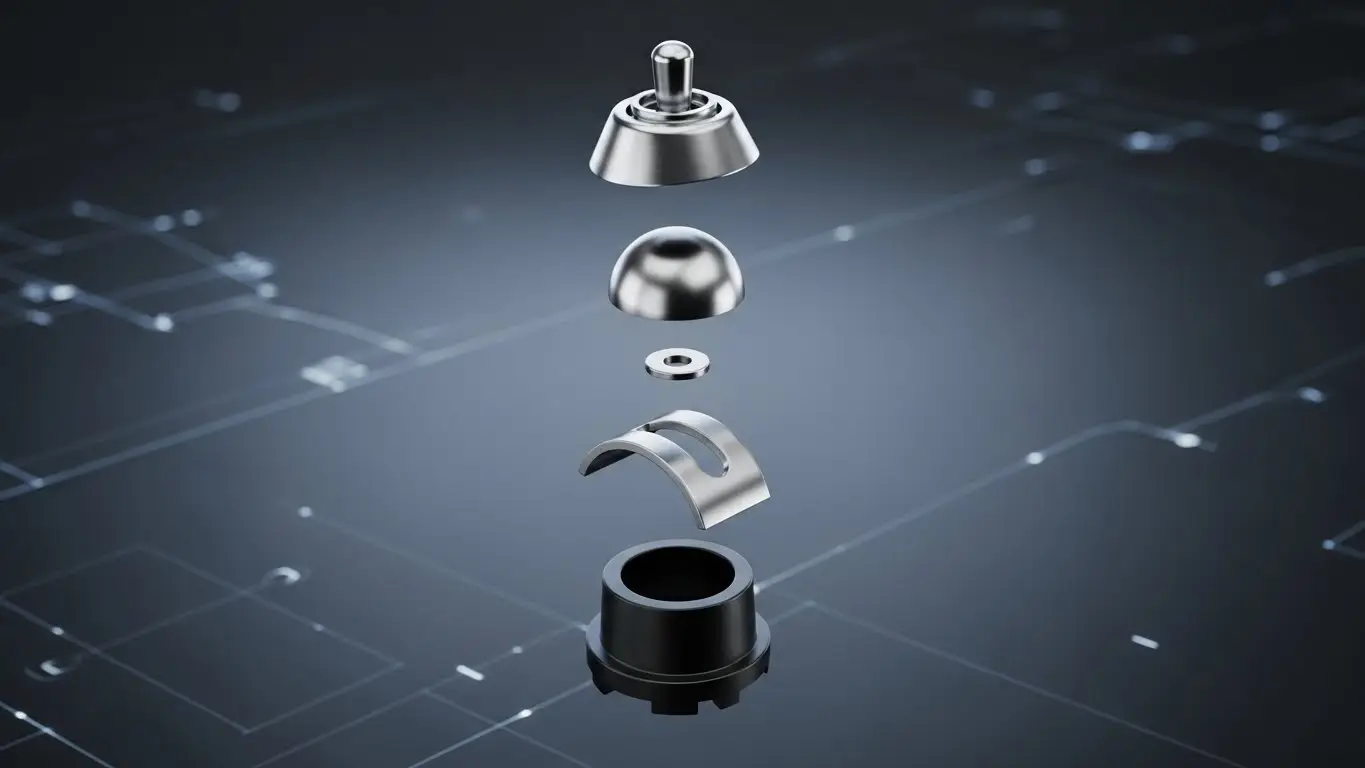
The "click" isn't just a sound; it’s a complex interaction of force and travel.
- Actuation Force (Fa): The peak force required to collapse the dome.
- Return Force (Fr): The force the dome exerts to return to its resting state.
- Travel (Stroke): The distance the plunger moves.
- Click Ratio: A calculated percentage that determines how "snappy" a switch feels. A higher ratio generally implies a crisper, more distinct feel, while a lower ratio feels softer or "mushy."
Engineer’s Note: In high-volume consumer electronics, consistent haptics are a brand differentiator. A "click ratio" variation of even 10% can be perceptible to a sensitive user.
Why Are Tact Switches the Standard for Consumer Devices?
Tact switches are preferred because they offer a superior balance of compact size, reliable haptic feedback, and cost-effectiveness compared to other switching technologies.
In the competitive landscape of consumer tech, real estate on a Printed Circuit Board (PCB) is at a premium. Tact switches, specifically Surface Mount (SMT) varieties, allow engineers to place reliable input methods in incredibly tight spaces—like the edge of a smartwatch or the side of a hearing aid.
Key Advantages for Modern Devices
- Unmistakable Feedback: Unlike capacitive touch buttons, which often require vibration motors (haptic engines) to simulate a press, a mechanical tact switch provides passive feedback. This reduces battery drain and complexity.
- High Reliability: Modern tact switches are rated for 100,000 to over 10 million cycles. For a TV remote, 100k is sufficient; for a gaming mouse, 10 million is the baseline.
- Assembly Efficiency: SMT tact switches are compatible with pick-and-place machines and reflow soldering, streamlining mass production.
| Feature | Tact Switch | Membrane Switch | Capacitive Touch |
| Feedback | Physical Snap (Crisp) | Soft / None | None (requires motor) |
| Profile | Low to Ultra-Low | Ultra-Low | Flat |
| Life Cycle | High (1M+) | Medium | High |
| Cost | Low | Low | Medium/High |
| Waterproofing | IP67/IP68 Available | Inherently Good | Excellent |
How Do You Select the Right Tact Switch for Your Application?
Selection depends on three critical pillars: physical dimensions (form factor), haptic requirements (actuation force), and environmental resistance (IP rating).
Choosing the "perfect" switch is about matching the component's specifications to the device's operating environment and the user's ergonomic expectations. A switch used in a rugged outdoor GPS unit has vastly different requirements than one used in a living room thermostat.
1. Form Factor and Mounting
- SMT (Surface Mount Technology): The standard for compact devices. They sit directly on the PCB surface.
- Through-Hole: Offers higher mechanical strength (shear resistance). Ideal for buttons that will be pressed with significant force or from an angle.
- Right-Angle / Side-Push: crucial for side-mounted volume or power buttons on thin devices like tablets.
2. Actuation Force: The "Feel" Factor
The force required to press the switch dictates the user experience.
- Low Force (100gf - 160gf): Light touch. rapid actuation. Common in keyboards or complex control panels where fatigue is a concern.
- Medium Force (160gf - 260gf): The "Standard" click. Used in remote controls and general appliances. Distinct but easy to press.
- High Force (300gf - 500gf+): Heavy, deliberate actuation. Essential for automotive interfaces or safety-critical functions to prevent accidental presses.
3. Environmental Protection (IP Rating)
For devices like sports headphones or kitchen scales, standard open switches will fail due to sweat, water, or flour dust.
- IP67: Dust-tight and protected against temporary immersion in water.
- Nano-coating: Some modern switches use internal hydrophobic coatings to repel moisture without bulky rubber seals.
Pro Tip: For detailed guidance on matching specific switch parameters to complex PCB layouts, refer to our technical switch application notes which cover advanced mounting strategies.
What Are the Most Common Problems with Tact Switches?
Common failures include loss of tactile feedback (mushy feel), intermittent electrical contact (flickering signal), and contamination from the assembly process.
Even high-quality switches can fail if not integrated correctly. Understanding these failure modes is key to prevention.
The "Flux" Issue
One of the most frequent issues in manufacturing is flux contamination. During wave soldering or hand soldering, excess flux can wick up inside the switch mechanism. Once inside, it can harden on the contact dome, insulating the contacts and causing the switch to stop working.
- Solution: Use sealed switches for wave soldering or adhere strictly to "keep-out" zones for flux application.
Mechanical Overload
If the button design (the plastic cap the user actually touches) doesn't have a mechanical stop, an aggressive user can crush the switch.
- Solution: Design the device casing so that the plastic button hits the casing before the switch plunger bottoms out completely. This "force bypass" ensures the switch never receives more force than it was designed to handle.
Silver Migration
In high-humidity environments, silver contacts can experience dendritic growth (migration) under voltage, leading to short circuits.
- Solution: For high-humidity applications (like bathroom electronics), use gold-plated contacts or switches with high insulation resistance specifications.
How Are Tact Switches Evolving for Future Electronics?
The future lies in miniaturization (ultra-thin profiles), silence (noiseless actuation), and "smart" integration where switches serve dual functions.
Ultra-Low Profile & Miniaturization
As smartphones fold and wearables shrink, the Z-height (thickness) of switches is being pushed to the limit. We are now seeing switches with profiles as low as 0.35mm. These "film" style tact switches use ultra-thin metal domes and virtually no housing, embedded directly into flexible printed circuits (FPC).
Silent Operation
While the "click" is desirable for many, it is distracting in others. "Quiet" or "Silent" tact switches maintain the feel of the collapse but dampen the sound. This is increasingly popular in:
- Hearables: Buttons on earbuds where a loud click would resonate unpleasantly in the ear canal.
- Library/Office Mice: To reduce noise pollution in shared workspaces.
Integrated Illumination
Illuminated tact switches with built-in LEDs are not new, but they are becoming more efficient. RGB tact switches allow for status indication (e.g., Red for low battery, Green for connected) directly on the actuation point, saving PCB space by combining the light pipe and the switch.
Technical Deep Dive: The Importance of "Click Ratio"
Click ratio is the metric that defines the sharpness of the switch's feedback, calculated as (Actuation Force - Return Force) / Actuation Force.
A switch with a 50% click ratio feels very "snappy" and distinct. A switch with a 15% click ratio feels soft.
- High Ratio (>50%): Best for single-press functions (e.g., Power On/Off).
- Low Ratio (<30%): Best for rapid-fire inputs (e.g., Double-clicking a mouse or rapid volume adjustment) where a heavy snap would slow the user down.
Designers must specify this tolerance. A "300gf" switch from two different vendors can feel completely different if one has a 30% click ratio and the other has a 60% click ratio.
Applications in Key Consumer Sectors
1. Wearables & Hearables
- Requirement: Ultra-compact, IP68 waterproof, high cycle life.
- Solution: 2x3mm side-actuated SMT switches. The focus here is on sealing against sweat and skin oils.
2. Gaming Controllers
- Requirement: Extreme durability (millions of cycles), precise actuation point, rapid return.
- Solution: Custom-tuned dome switches with a specific force curve to prevent finger fatigue during marathon sessions.
3. Smart Home Devices (IoT)
- Requirement: Aesthetic feel, distinct "quality" sound, reliability.
- Solution: Larger, illuminated tact switches that serve as the focal point of the device interface (e.g., the main button on a smart thermostat).
Troubleshooting Guide for Engineers
If you are experiencing field failures, consult this quick checklist:
- Is the switch stuck "closed"? Check for silver migration or a collapsed dome due to excessive force.
- Is the switch stuck "open"? Check for flux contamination or dust ingress (insulating the contact).
- Is the feel inconsistent? Check the tolerance of your plastic actuator. If the gap between the button and the switch plunger varies, the user will feel "pre-travel" or "dead space."
For a more structured approach to diagnosing these issues, reviewing technical switch application notes can provide the specific testing protocols needed to isolate mechanical vs. electrical faults.
Summary: The Final Checklist for Designers
When specifying tact switches for consumer electronics, ensure you have defined:
- Operating Force: Does it match the intended user ergonomic?
- Life Expectancy: Does it meet the warranty period of the device?
- IP Rating: Will it survive the user's environment (kitchen, gym, outdoors)?
- Soldering Method: Is the switch compatible with your manufacturing flow (Reflow vs. Wave)?
- Acoustics: Is the sound of the click appropriate for the product identity?
By prioritizing these factors, you ensure that the very first interaction a user has with your product—turning it on—feels precise, premium, and professional.
Frequently Asked Questions (FAQ)
A tact switch is a specific type of momentary switch that provides distinct "tactile" feedback (a click) and is generally smaller with lower current ratings (usually under 50mA). Push-buttons can be latching or momentary, often handle higher currents, and may not always offer the "snap" sensation.
No, most tact switches are designed for low-voltage signal switching (logic level, e.g., 12V DC, 50mA). For high-power applications, they should be used to trigger a relay, MOSFET, or microcontroller input, rather than carrying the full load directly.
IP67 indicates the switch is totally protected against dust ingress (the "6") and can withstand immersion in water up to 1 meter depth for 30 minutes (the "7"). This is ideal for wearables and portable electronics exposed to elements.
The most common cause is flux contamination. If non-sealed switches are washed or if excessive flux is applied, it can wick inside the switch housing and insulate the contacts. Always use sealed switches if a washing process is required.
Standard consumer-grade tact switches are rated for 100,000 to 500,000 cycles. High-end or industrial variants can be rated for 1 million to 10 million cycles. Always check the datasheet for the "Life Cycle" or "Durability" specification.
