





Tact Switch Travel Distance Explained: The Engineering Guide
Tact switch travel distance (often called "stroke") is the vertical distance the actuator moves from its resting position to its fully depressed state. For standard electromechanical tact switches (like the common 6x6mm format), this distance is microscopic—typically ranging from 0.1mm to 0.5mm.
While this movement seems negligible, it defines the switch's "personality." The travel distance dictates the haptic feedback (crisp vs. soft), the user's perception of quality, and the mechanical tolerances required for your device's housing. Choosing the wrong stroke can lead to accidental actuations in sensitive equipment or a "dead" feeling interface in consumer devices.
The Anatomy of a Switch Press: It's Not Just One Number
Engineers often look at the datasheet and see a single number: Travel: 0.25mm +0.2/-0.1mm. However, the physical action involves three distinct phases that determine reliability.
1. Pre-Travel (The "Slop")
This is the distance the actuator moves before the internal dome begins to deform. In high-quality tact switches, this should be near zero. Excessive pre-travel makes the button feel loose or "rattling" before the click.
2. Actuation Point (The "Make" Point)
This is the specific depth where the metal dome collapses (snaps) and touches the stationary contacts, closing the electrical circuit. In most metal dome switches, the actuation point and the tactile "click" happen simultaneously.
3. Overtravel (The Buffer)
This is the distance the button can continue to travel after the electrical contact is made.
- Metal Domes: Have almost zero overtravel. Once they snap, they hit the PCB.
- Rubber Stems: Have significant overtravel (compression), which provides a softer landing.
Engineering Insight: Lack of overtravel is why metal dome switches feel "harsh." The impact shock is transferred directly to the user's finger. If you need a premium feel, you often need a switch with built-in overtravel or an external rubber actuator.
Short vs. Long Travel: Which Should You Choose?
The industry generally divides tact switches into two categories based on their internal construction.
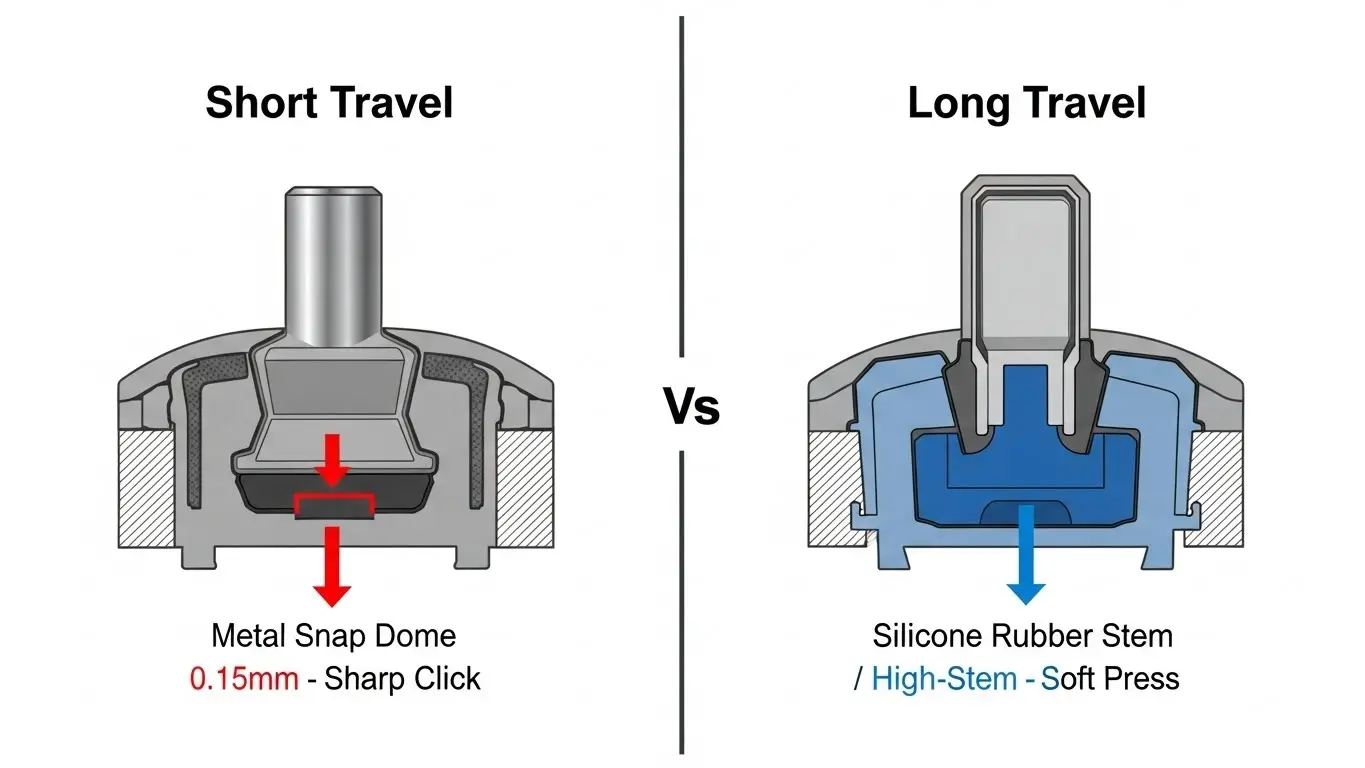
Short Travel (0.1mm – 0.3mm)
These are the most common switches, found in everything from microwave ovens to computer mice. They use a simple metal snap dome.
- Feel: Sharp, crisp, loud click.
- Mechanism: Direct contact. The plunger pushes the dome; the dome hits the PCB.
- Best For: High-speed input, double-clicking, and space-constrained PCBs.
- Risk: Requires tight casing tolerances. If your external plastic button is just 0.1mm too long, it might permanently depress the switch.
Long Travel (0.35mm – 1.0mm+)
These switches usually modify the internal plunger, adding a rubber element or a longer spring mechanism.
- Feel: Soft, silent, smooth. Often described as a "thud" rather than a "click."
- Mechanism: Rubber compression.
- Best For: Automotive dashboards, medical devices, and environments where vibration might cause accidental presses on a sensitive short-travel switch.
- Risk: Can feel "mushy" if the actuation force is too low.
Comparison: The Engineering Trade-off
| Feature | Short Travel (Metal Dome) | Long Travel (Rubber/Spring) |
| Typical Spec | 0.15mm - 0.25mm | 0.35mm - 0.5mm+ |
| Feedback | High Tactile Ratio (Snappy) | Low Tactile Ratio (Soft) |
| Sound | Audible Click | Muted / Silent |
| Actuation Speed | Fast (<10ms) | Slower |
| Tolerance Forgiveness | Low (Needs precision) | High (Forgives misalignment) |
| Common Use | Consumer Electronics, IoT | Automotive, Industrial Panels |
For a deeper comparison of how these mechanics affect the user's perception of force, see our guide on how tact switch actuation force works.
The "Gaming Keyboard" Confusion
It is vital to distinguish component tact switches from mechanical keyboard switches.
- Component Tact Switch (This Article): Soldered onto a PCB for device control. Travel = ~0.25mm.
- Mechanical Keyboard Switch (Cherry MX Style): Used for typing. Travel = ~4.0mm.
Do not confuse these datasheets. Specifying a "Blue Switch" style travel for a handheld medical device will result in a component that is far too large and physically unstable for the application.
How Travel Affects Lifecycle and Reliability
There is a common misconception that "more travel equals more wear." In reality, short travel switches often have longer lifespans.
A standard metal dome switch (0.25mm travel) can easily reach 10 million cycles because the metal is only deforming slightly within its elastic limit. Long-travel switches that rely on rubber compression eventually suffer from material fatigue—the rubber hardens, cracks, or loses its rebound memory, leading to a "stuck" switch.
However, short travel switches are more vulnerable to contamination. Because the contact gap is microscopic, even a tiny particle of dust can block the signal. For harsh environments, you must prioritize sealing over travel distance. (See: How IP67 Waterproof Ratings Work).
Design Tips: Managing Tolerances with Travel
If you select a switch with 0.20mm travel, your external button design becomes critical.
- The "Pre-Load" Danger: If your external plastic button presses on the switch with just 50 grams of force due to tight assembly screws, you might be using up 0.10mm of the travel permanently. This leaves only 0.10mm for the user, making the switch feel hair-trigger sensitive or causing it to fail (stuck ON).
- Gap Design: For short-travel switches, you typically need a "floating" button design where the external cap rests slightly above the switch plunger, ensuring zero force is applied in the resting state.
When laying out your board, ensure you leave room for these tolerance stacks. For more on footprint placement, review our PCB Layout Tips for SMD DIP Switches.
Frequently Asked Questions
Not necessarily. You can have a long-travel switch (0.5mm) with a light force (100gf), which will feel very soft and spongy. Conversely, you can have a short-travel switch (0.2mm) with a heavy force (300gf), which will feel extremely snappy and rigid. Force and Travel are independent variables, though they work together to create the "feel."
Cars vibrate. A short-travel switch (0.15mm) might accidentally trigger if the car hits a pothole and the chassis flexes. A longer travel (0.5mm+) acts as a safety buffer. Additionally, drivers often wear gloves, which mask tactile sensitivity; longer travel provides better feedback that the button was actually pressed.
This usually refers to momentary vs. latching tact switches. In a latching switch, the "Make" travel (to turn ON) might be 1.5mm, but the "Release" travel (to turn OFF) might be slightly shorter or longer depending on the internal cam mechanism. Standard momentary switches do not have differential travel in this context.
No. The travel is fixed by the internal dome geometry. If you need to change the travel distance, you must select a different part number. attempting to shorten travel by adding spacers usually results in a switch that is permanently stuck or unreliable.
Key Takeaways
- Standard Range: Most electromechanical tact switches have a travel between 0.15mm and 0.35mm.
- The Feel Factor: Short travel = Snappy (Metal Dome). Long travel = Soft (Rubber/Spring).
- Tolerance Trap: Short travel switches require precise casing manufacturing to avoid accidental "pre-loading" of the switch.
- Application Rule: Use short travel for rapid data input (keypads, mice). Use long travel for safety-critical or high-vibration environments (automotive, industrial).
Conclusion
Selecting the right tact switch travel distance is about matching the component to the environment. For a sleek, responsive handheld device, a 0.2mm short-travel switch offers precision and speed. For a rugged industrial controller used by gloved operators, a 0.5mm long-travel switch ensures deliberate, error-free input.
Always review the "Force-Stroke" curve in the datasheet—not just the travel number—to ensure the switch provides the feedback your users expect.
