





Tact Switch Lifecycle Ratings Explained
A tact switch lifecycle rating represents the estimated number of actuation cycles (presses) the component can endure before failing to meet its electrical or mechanical specifications. Most standard tactile switches are rated between 100,000 and 1,000,000 cycles, though high-end durable models can reach up to 10 million cycles.
It is critical to understand that "End of Life" doesn't necessarily mean the switch stops working entirely. Instead, it means the switch has exceeded acceptable tolerance levels—typically defined as a rise in contact resistance (often >1Ω), a loss of tactile force (feeling "mushy"), or excessive contact bounce. For engineers, selecting the right lifecycle rating is a balance between component cost and the predicted longevity of the final product.
What Determines a Tact Switch's Lifespan?
The lifespan of a tactile switch is not a random number; it is a calculated result of materials, engineering, and physics. Several key factors determine whether a switch lasts for a month or a decade.
Material Composition
The "heart" of a tact switch is the contact dome. Stainless steel domes generally offer higher fatigue resistance than phosphor bronze. Furthermore, the plating on the contacts plays a massive role. Silver-plated contacts are standard and cost-effective but prone to sulfuration over time. Gold-plated contacts offer superior corrosion resistance and are essential for low-current applications requiring high reliability over millions of cycles.
Mechanical Stress and Force
There is a direct physical correlation between the force required to press the switch and how long it lasts. Generally, the higher the actuation force, the lower the lifecycle.
A heavy 260gf (gram-force) switch places significantly more stress on the metal dome during deformation than a light 100gf switch. This relationship is detailed further in our guide on how tact switch actuation force works, where we explore the physics of the force-stroke curve.
Environmental Factors
Dust, moisture, and temperature fluctuations accelerate wear. A switch rated for 1 million cycles in a clean room may fail at 100,000 cycles in a humid, dusty factory if it lacks proper IP sealing (like IP67).
How Many Cycles Do I Actually Need?
You should match the switch rating to the expected user behavior of the specific device.
Over-specifying a switch (using a 10-million cycle switch for a reset button used once a year) wastes budget. Under-specifying leads to warranty returns.
| Application Type | Typical Usage Frequency | Recommended Lifecycle Rating |
| Emergency/Reset Buttons | Rare (Once/Month) | 50,000 - 100,000 Cycles |
| Consumer Electronics | Moderate (Power buttons, TV Remotes) | 100,000 - 500,000 Cycles |
| Appliances | Frequent (Microwaves, Washing Machines) | 500,000 - 1,000,000 Cycles |
| Gaming & Peripherals | Heavy (Mice, Controllers, Keyboards) | 5,000,000 - 10,000,000+ Cycles |
Does the Type of Switch Mechanism Affect Durability?
Yes, the internal mechanical structure dictates the wear pattern.
While standard momentary switches rely on the simple elastic deformation of a dome, other mechanisms introduce complex friction points. For instance, when comparing momentary vs. latching tact switches, momentary switches almost always have a superior lifecycle. Latching switches require a hook-lock or cam mechanism to hold the position, which introduces mechanical wear parts that fail much faster than a simple metal dome.
Similarly, the snap-action mechanisms found in larger switches share these physics. You can read more about these mechanics in our Micro Switch Deep Dive, which parallels the durability testing found in tactile switches.
How Do Manufacturers Test Switch Life?
Manufacturers use automated pneumatic testing rigs that press the switch repeatedly at a specific rate (usually 2-3 times per second) until failure.
However, you must read the datasheet "Conditions" carefully. A switch might be rated for 1 million cycles, but only if tested at:
- Vertical Alignment: The force is applied directly to the center. Off-center presses (common in real-world use) drastically reduce life.
- Specific Force: Tested at the rated force, not excessive impact force.
- Load: Tested at 5V DC / 5mA (resistive load). Testing at higher voltages or inductive loads will cause electrical arcing, pitting the contacts and ending the life early.
Why Do Tact Switches Eventually Fail?
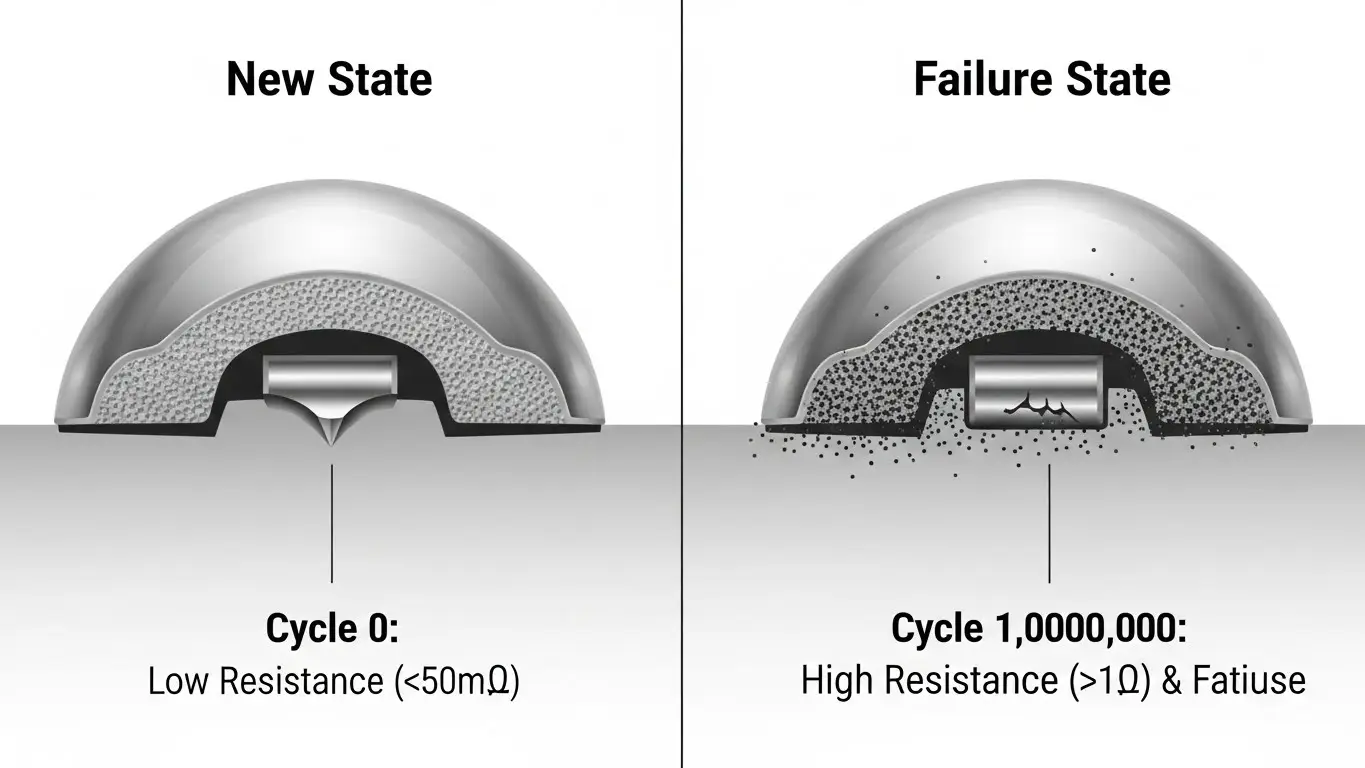
Tact switches typically fail due to contact resistance spikes caused by contamination or metal fatigue fractures in the dome.
1. Contact Resistance Increase
As the switch is cycled, the plating wears off, and oxides build up. Once the resistance rises (usually above 100mΩ or 1Ω depending on the spec), the device may stop registering the press, even if the "click" still feels normal.
2. Metal Fatigue
Every time the dome snaps, micro-fractures occur in the metal grain structure. Eventually, the dome cracks, leading to a permanent "open" circuit or a loss of the tactile "snap."
3. Contact Bounce
As the spring mechanism weakens, the contacts may "bounce" multiple times upon closure. If the bounce time exceeds the software's debounce logic (e.g., >10ms), a single press might register as a double click.
Frequently Asked Questions
Generally, no. Standard tact switches are not designed to be user-lubricated. Adding improper grease can attract dust or insulate the contacts, causing immediate failure. Sealed switches come pre-lubricated internally if necessary.
Mechanical life is how many times the switch can physically click. Electrical life is how many times it can switch a load without arcing or resistance failure. Electrical life is usually shorter, especially under high voltage/current loads.
This is a symptom of "Contact Bounce" caused by an aging switch. The spring mechanism has weakened, causing the contacts to rattle as they close. It indicates the switch has reached its end of life.
Not necessarily. While "snappy" switches (high tactile ratio) undergo more violent stress deformation, soft switches (silicone rubber) can suffer from rubber degradation or tearing over time. Metal domes are generally more consistent over long periods.
Look for the "Operating Life" or "Durability" section. It will be listed as "Cycles" (e.g., 100,000 cycles). Pay attention to the "Test Conditions" note right next to it, which defines the load and speed of the test.
Key Takeaways
- Definition: Lifecycle is not just about breaking; it's about staying within resistance and force specifications.
- Range: Standard switches last 100k–500k cycles; premium switches reach 10M+.
- Force Trade-off: Higher actuation force usually results in a lower lifecycle rating due to increased metal stress.
- Application Matching: Don't pay for 10 million cycles for a power button; invest in high cycles for gaming or industrial interfaces.
Conclusion
Understanding tact switch lifecycle ratings is essential for ensuring your product's reliability matches your warranty promises. By selecting the correct cycle rating—and understanding the trade-offs with actuation force and mechanism type—you can avoid premature failures and costly redesigns.
If you are currently selecting components for a new design, verify the datasheet testing conditions and always test sample batches in your specific enclosure to account for off-center actuation.
