





Beyond the Click: Long-Life Alternatives to Standard Tact Switches
Are you tired of replacing failed tactile switches? While standard tact switches are affordable and ubiquitous, they have a finite lifespan—typically rated for 100,000 to 500,000 cycles. For mission-critical devices, industrial controls, or high-end consumer electronics, this simply isn't enough.
The best long-life alternatives to standard tact switches fall into two categories: contactless mechanical options (like Optical and Hall Effect switches) which offer 50M+ cycles while retaining physical feedback, and solid-state options (like Piezo and Capacitive sensors) which offer effectively infinite life but require haptic feedback to simulate a "click."
In this guide, we break down the most durable replacements that will extend your product's life from months to decades.
Why Do Standard Tact Switches Fail?
Before choosing a replacement, it is vital to understand why the standard part fails.
- Metal Fatigue: The metal dome inside the switch eventually cracks after repeated flexing.
- Contact Oxidation: The electrical contacts degrade over time, leading to "bounce" or failure to register a press.
- Ingress: Dust and moisture get inside the mechanism (the "plunger" gap is a notorious leak path).
If you are dealing with space constraints alongside durability issues, you should first check our guide on alternatives to tact switches in compact devices, which specifically addresses low-profile solutions.
Category 1: "The Infinite Click" (Contactless Mechanical)
Best for: Keyboards, Gaming, and Control Panels where "Feel" is mandatory.
These alternatives keep the physical button and spring but remove the electrical contacts—the part that usually fails first.
1. Optical Switches (The Speed Kings)
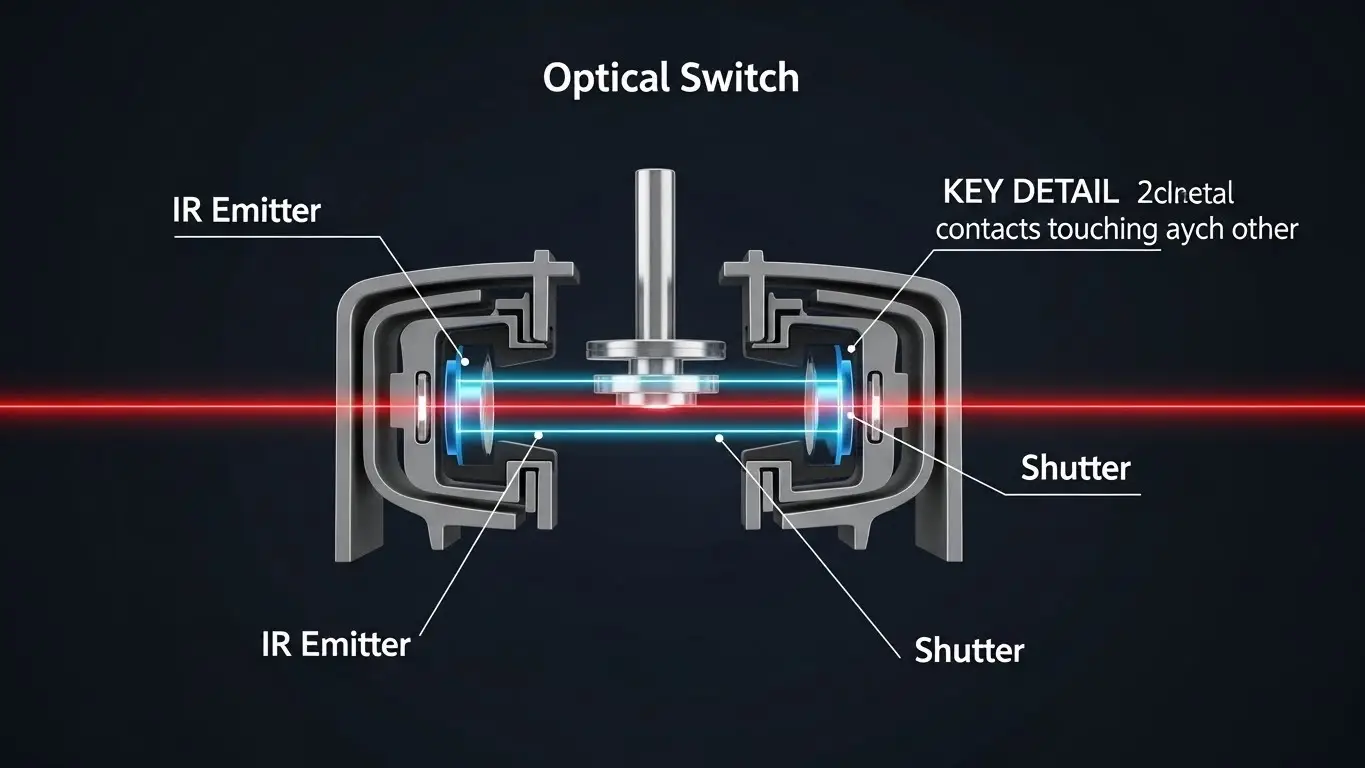
- Lifespan: 100 Million+ Cycles
- How it works: A plunger breaks a beam of infrared light to register a press. There is no metal-on-metal contact for the signal.
- Pros: Extremely fast response (low latency), immune to contact bounce/oxidation.
- Cons: Requires "always-on" power for the IR LED (higher power consumption).
2. Hall Effect Switches (The Magnetic Standard)
- Lifespan: 50 Million - 100 Million Cycles
- How it works: A magnet on the plunger moves closer to a Hall Effect sensor on the PCB. The sensor detects the change in magnetic field.
- Pros: Fully sealed potential (waterproof); adjustable actuation point (you can set when the key registers in software).
- Cons: Sensitive to external magnetic interference.
Category 2: "The Indestructible Surface" (Solid State)
Best for: Medical Devices, Industrial Controls, Outdoor Kiosks.
These options remove moving parts entirely. If you are upgrading a rugged device, this is the gold standard.
3. Piezo Switches (The Vandal-Proof Choice)
- Lifespan: 50 Million+ Cycles
- How it works: Pressure on the panel bends a piezo crystal microscopically, generating a voltage pulse.
- Pros: Works with gloves; can be made of solid stainless steel; totally sealed (IP68/IP69K).
- Cons: Requires a "hard" press; costs significantly more than a plastic switch.
4. Capacitive Touch (The Modern Aesthetic)
- Lifespan: Infinite (Limited only by electronics)
- How it works: Detects the electrical capacitance of a finger through glass or plastic.
- Pros: Zero wear; sleek aesthetic; easy to clean.
- Cons: No tactile feedback; struggles with water droplets (unless tuned correctly).
- Deep Dive: Unsure if you can lose the "click"? Read our detailed comparison: When to Use Touch Sensors vs Tactile Switches.
Category 3: The "Middle Ground" Upgrade
5. High-Rel Metal Domes (Snap Domes)
If you can't redesign the entire PCB for optical or capacitive sensors, simply upgrading the quality of the switch component is the easiest fix.
- Standard Tact: ~100k - 500k cycles.
- High-End Metal Dome: 1 Million - 5 Million cycles.
- Why: Premium domes use specialized stainless steel alloys and gold plating to resist fatigue and corrosion.
- Learn More: For a breakdown of these specific components, see Best Alternatives to Micro Tact Switches.
Comparison Matrix: Selecting Your Long-Life Alternative
| Feature | Standard Tact | Optical Switch | Hall Effect | Piezo Switch | Capacitive Touch |
| Cycle Life | < 1 Million | 100M+ | 100M+ | 50M+ | Infinite |
| Tactile Feel | Good (Crisp) | Variable | Linear/Smooth | None (Stiff) | None |
| Waterproof | Poor | Good | Excellent | Best | Best |
| Power Usage | Zero (Passive) | High (LEDs) | Low | Zero (Passive) | Low (Active) |
| Cost | $ | $$ | $$$ | $$$$ | $$ |
The Hidden Cost of Upgrading
Moving away from standard mechanical switches often requires a rethink of your device's architecture.
- Firmware: Capacitive and Hall Effect sensors require active monitoring firmware, unlike a simple "On/Off" interrupt.
- Configuration: With more complex inputs, you might need better ways to configure the device itself. Consider replacing internal setup switches with software methods, as detailed in our guide on DIP Switch Replacement Solutions.
- Infrastructure: If you are upgrading the user interface for reliability, ensure the underlying network hardware is equally robust. See Industrial Ethernet Switch Alternatives for insights on rugged connectivity.
Frequently Asked Questions
Piezo switches and Capacitive touch are best. Piezo is superior if the water is turbulent or if the user wears thick gloves, as capacitive sensors can be triggered falsely by water or miss touches through gloves.
Yes, electrically. However, they still have mechanical moving parts (the stem and spring) which give the button its feel. While the signal won't fail, the spring can still wear out over decades, though far later than a metal contact would.
Generally, no. Hall Effect switches require 3 pins (Power, Ground, Output) and specific magnetic sensor placement, whereas a standard tact switch is a simple 2-pin or 4-pin passive device. A PCB redesign is required.
Most standard piezo switches are passive—the pressure generates the voltage pulse. However, extended-pulse piezo switches (which stay "on" longer) do require a power source.
Key Takeaways
- For Gaming/Typing: Choose Optical Switches for speed and durability (100M cycles) without losing the mechanical feel.
- For Industrial/Outdoor: Choose Piezo Switches for vandal-proof, sealed, glove-friendly operation.
- For Medical/Hygienic: Choose Capacitive Touch for an easy-to-clean surface with infinite life.
- For "Feel" Critical: If you must have a click but need higher durability than standard, upgrade to High-Rel Metal Domes or Hall Effect buttons.
Conclusion
The "standard" tact switch is a legacy component that often becomes the weakest link in modern product design. By selecting the right long-life alternative—whether it's the optical precision for a keyboard or the rugged invincibility of a piezo sensor for a machine—you invest in the perceived quality and reliability of your brand. Don't let a $0.10 switch cause a $1000 service call.
