





Industrial Switches: A Comprehensive Guide for Beginners
New to industrial networking? Discover the key differences between commercial and industrial switches, unmanaged vs. managed options, and how to choose the right hardware for your facility. The PLCs are running, the power is on, but the data isn’t flowing. After hours of troubleshooting and thousands of Euros in lost production, you find the culprit: a €50 plastic Ethernet switch tucked inside a control cabinet that simply cooked itself to death because it couldn't handle the heat.
This is a story we hear all too often at HX-Switch.
In the world of manufacturing and automation, the network is the nervous system of your operation. While it might be tempting to pick up standard networking gear from a local electronics store, the harsh reality of the factory floor requires something far more robust.
If you are new to industrial networking, this guide is for you. We will break down exactly what industrial switches are, why they are critical for uptime, and how to choose the right specifications without overspending.
Commercial vs. Industrial Switches: The "Why"
The most common question we get is, "Why can't I just use a standard office switch?"
The short answer is environmental tolerance. An industrial Ethernet switch is specifically engineered to operate reliably in harsh environments characterized by extreme temperatures, vibrations, electrical noise, and dust.
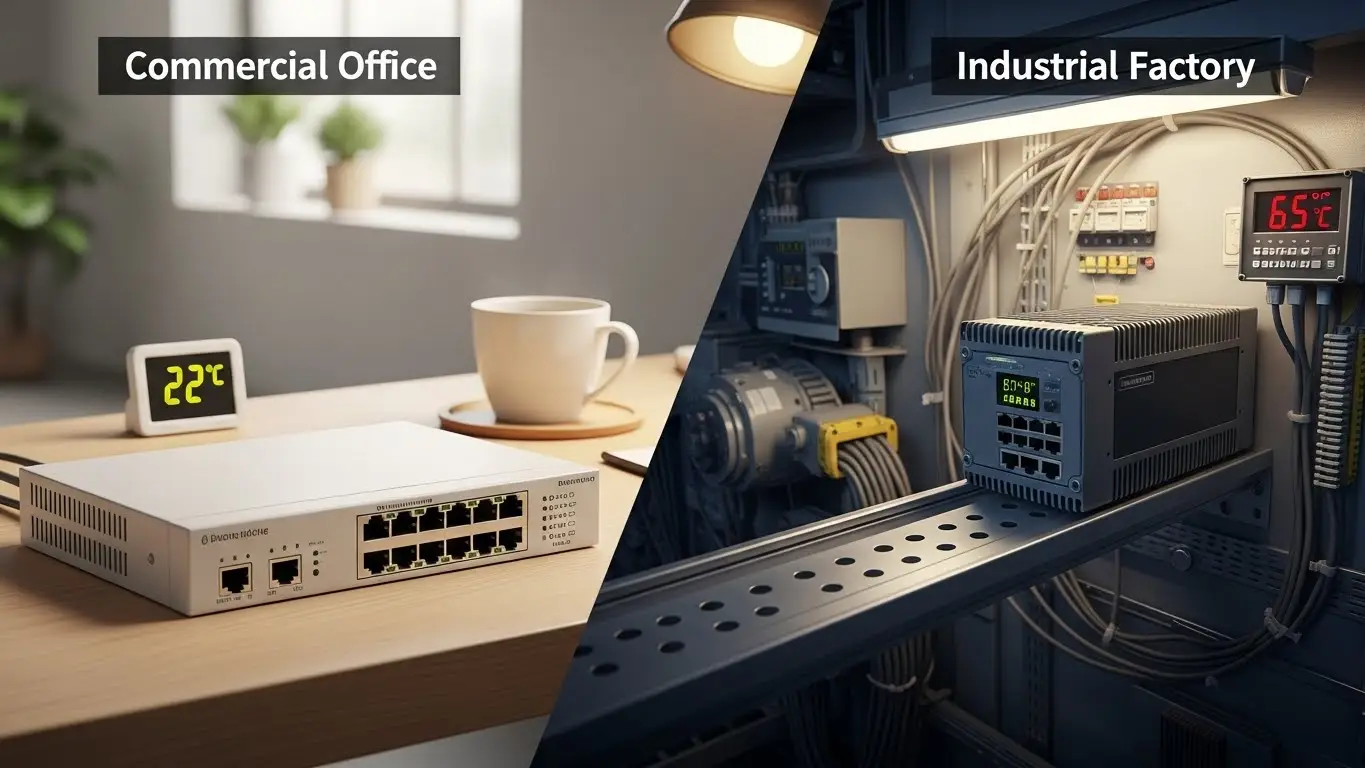
While a commercial switch is designed to sit in a climate-controlled server room (usually kept at a comfortable 20°C), industrial gear is built for the trenches.
Physical Build and Cooling
If you pick up a standard commercial switch, it likely has a plastic casing and relies on a fan to keep cool. In a factory, fans are a liability—they suck in dust, moisture, and metal filings, which eventually kill the internal components.
In contrast, our industrial switches utilize an aluminum or metal casing with a "fanless" design. We use the metal housing itself as a heat sink to dissipate heat. No moving parts mean fewer points of failure.
Environmental Tolerance
The specs on the sticker matter. Here is the reality of the difference:
- Temperature: Office gear usually fails if it gets hotter than 40°C or colder than 0°C. Industrial switches are rated for -40°C to +75°C. Whether it’s a freezing cold warehouse in Scandinavia or a sweltering steel mill, the data keeps moving.
- Vibration: Heavy machinery causes constant micro-vibrations. Standard RJ45 ports can wiggle loose over time, causing intermittent packet loss. Industrial switches use reinforced mounts and stronger component soldering to withstand shock.
- EMI Protection: Factories are full of "noise" from motors, welding equipment, and high-voltage drives. This Electromagnetic Interference (EMI) can scramble data on a standard switch. Industrial units come with high-grade EMC shielding to protect signal integrity.
Core Types of Industrial Switches
Once you have decided to go industrial, you need to determine which "brain" your network needs. Generally, you will choose between Unmanaged and Managed options.
Unmanaged Industrial Switches
Think of these as "Plug and Play." Unmanaged switches are simple devices that connect Ethernet devices together. They require no configuration—you simply plug in your cables, and they work.
- Best For: Connecting edge devices (like simple sensors, HMI panels, or machinery utilizing micro switches) to a network where you don’t need to remotely monitor the traffic.
- The Bottom Line: If you just need to expand ports in a cabinet and don't need to control the data flow, an unmanaged switch is a cost-effective, reliable choice.
Managed Industrial Switches
Managed switches allow you to configure, manage, and monitor your Local Area Network (LAN). They give you control over how data travels across the network and who has access to it.
- Key Features: They support protocols like SNMP (Simple Network Management Protocol) for remote monitoring and VLANs for segmenting traffic.
- Best For: Critical infrastructure where downtime is not an option. If a camera goes down or a PLC loses connection, a managed switch can alert you instantly.
PoE (Power over Ethernet) Switches
PoE switches transmit both data and electrical power over a single Ethernet cable. This eliminates the need for extra electrical wiring for devices like IP cameras, VoIP phones, or wireless access points.
Pro Tip: Always check the PoE standard.
- PoE (802.3af): Up to 15.4W (Good for simple phones).
- PoE+ (802.3at): Up to 30W (Standard for modern IP cameras).
- PoE++ (802.3bt): Up to 60W or 100W (For PTZ cameras or high-power sensors).
Key Features You Must Understand
When reading a datasheet from HX-Switch or any other manufacturer, you will see a lot of acronyms. Here are the three that actually matter for reliability.
Redundancy Protocols (The "Spare Tire")
In an office, if a cable breaks, someone loses the internet for a few minutes. In a factory, that cable break stops production.
Managed industrial switches often support Ring Topologies using protocols like ERPS (Ethernet Ring Protection Switching). Instead of a straight line, the switches are connected in a loop. If one cable is cut, the data instantly (in less than 20 milliseconds) reverses direction to keep the network alive. It’s essentially a self-healing network.
Redundant Power Inputs
You will notice most of our industrial switches have terminal blocks for Dual DC Inputs (e.g., P1 and P2).
This allows you to connect two separate power supplies to the same switch. If Power Supply A dies, the switch automatically pulls from Power Supply B without even a microsecond of downtime. It is a small feature that saves massive headaches.
Durability Standards (IP Ratings)
The "Ingress Protection" (IP) rating tells you what can get inside the switch.
- IP30/IP40: Protected against solid objects (like tools or wires) usually greater than 2.5mm or 1mm. This is standard for switches mounting inside a control cabinet.
- IP67: Dust-tight and waterproof. These switches are rare and expensive, used only when the switch is mounted outside a cabinet, directly exposed to rain or washdowns.
How to Choose the Right Switch
Selecting the right hardware doesn't have to be complicated. At HX-Switch, we recommend following this simple four-step decision framework to ensure you don't over-spec or under-spec your project.
- Assess the Environment: Is the cabinet climate-controlled? If not, or if there is heavy vibration, Industrial is mandatory.
- Determine Data Load: Do you need Gigabit speed? For simple data logging, 10/100Mbps is often enough. For video surveillance, Gigabit is a must.
- Check Power Needs: If you are connecting cameras, calculate the total wattage required and ensure the switch's "Power Budget" can handle it.
- Form Factor: Most industrial sites use DIN-Rail mounting. Ensure you have the physical space on the rail in your cabinet.
Installation Best Practices
Even the best switch in the world will fail if installed incorrectly. Based on years of analyzing support tickets, here are the two things you must get right.
The Importance of Grounding
This is the number one cause of failure we see. Industrial environments are full of stray electricity. If your switch isn't properly grounded via the designated grounding screw on the casing, that stray electricity will discharge through the copper ports, frying the chip. Always connect the ground wire.
Matching the Power Supply
Unlike office switches that come with a wall plug, industrial switches usually require an external power supply (DIN-rail mount).
- Check the voltage input (usually 12V-48V DC).
- If you are using PoE, you often need a stronger power supply (48V-52V DC) to generate enough juice for the connected devices.
Common Beginner Mistakes to Avoid
- Ignoring the Power Budget: Buying an 8-port PoE switch with a 60W budget, and then trying to plug in eight 15W cameras. (8 x 15W = 120W). The switch will shut down ports because it lacks the power to run them all.
- Using Office Patch Cables: In high-EMI areas, standard UTP (Unshielded Twisted Pair) cables act like antennas for noise. Use Shielded (STP) cables and industrial connectors.
- Forgetting Fiber for Distance: Copper Ethernet cables have a limit of 100 meters. If you need to connect a warehouse 300 meters away, you must use a switch with SFP (Fiber) slots.
Frequently Asked Questions
A Layer 2 switch works with MAC addresses to send data to the right device on a single network. A Layer 3 switch can function like a router, using IP addresses to route data between different networks (subnets). For most machine-level networks, Layer 2 is sufficient.
You can, but it is risky. A weatherproof box protects against rain, but it often traps heat. A commercial switch inside a sealed box in the summer can easily overheat and fail. Industrial switches are designed to handle that trapped heat.
DIN-rail is the standard metal rail used inside industrial control cabinets to mount circuit breakers and PLCs. Industrial switches come with a clip on the back to snap directly onto this rail, keeping the cabinet organized.
Most control cabinets and PLCs run on 24V DC. Industrial switches use this same standard so they can share the same power source as the rest of the automation equipment, eliminating the need for AC converters.
Due to high-grade components (like industrial capacitors) and effective heat dissipation, a quality industrial switch from HX-Switch typically has an MTBF (Mean Time Between Failure) of over 100,000 to 500,000 hours—often lasting 10+ years in the field.
Conclusion
Reliability is a choice. When you are building a network for a factory, a substation, or a traffic control system, the cost of the hardware is negligible compared to the cost of downtime.
By understanding the basics—temperature ratings, redundancy, and proper power management—you can build a network that you can install and forget.
The Bottom Line: Don’t let a weak link in your network compromise your production. Invest in hardware that works as hard as you do.
