





The definitive Industry Guide
In modern manufacturing, network failure isn't just a technical annoyance—it is a financial hemorrhage. If you have ever watched a production line grind to a halt because a communication packet was dropped, you know the stakes. The cost of downtime in automotive or pharmaceutical production can range from $20,000 to over $100,000 per hour. Yet, we frequently see a critical mistake in facility management: the reliance on standard, office-grade networking equipment in harsh industrial environments.
At HX-Switch, we understand that the factory floor is a hostile environment for electronics. Dust, vibration, extreme temperatures, and electromagnetic interference are constant threats that standard IT gear simply isn’t built to survive.
This guide covers everything you need to know about Industrial Ethernet Switches. From decoding IP ratings and understanding PoE power budgets to choosing between managed and unmanaged infrastructure, we are breaking down how to build a network that you can install and essentially forget.
Why Industrial Switches Are Non-Negotiable in Manufacturing
There is a fundamental difference between the switch sitting in a climate-controlled server room and the one mounted inside a control cabinet next to a vibrating conveyor belt. While a commercial switch might cost less upfront, the Total Cost of Ownership (TCO) skyrockets the moment it fails during a production run.
Industrial switches are engineered for Environmental Hardening. This isn't just marketing speak; it refers to specific compliance with standards like IEC 60068 (shock and vibration) and heavy industrial EMC standards.
Key Differentiators:
- Temperature Tolerance: Commercial gear typically operates between 0°C and 40°C. Industrial switches, like those we design at HX-Switch, are built for -40°C to +75°C. This is critical because the internal temperature of a control cabinet often exceeds the ambient room temperature by 10-15 degrees.
- Vibration and Shock: Machinery creates constant low-frequency vibration. A standard RJ45 port can loosen over time, causing intermittent packet loss—the hardest type of error to troubleshoot. Industrial units use stronger retention mechanisms and often support M12 connectors for vibration-heavy zones.
- Power Input: Unlike office switches that use a wall adapter, industrial switches utilize a terminal block for DC power (usually 12-48VDC), allowing them to run directly off the control cabinet's power supply with redundant inputs.
Managed vs. Unmanaged Switches: Making the Right Choice
One of the most common questions our engineering team receives is: "Do I really need a managed switch?" The answer depends entirely on your application's complexity and your tolerance for downtime.
Unmanaged Switches: The "Plug and Play" Solution
Unmanaged switches are simple, transparent bridges. They have no IP address and require no configuration.
- Best For: Connecting edge devices, simple machine cells, or temporary setups where traffic monitoring isn't required.
- The Limitation: If a network storm occurs (a data loop), an unmanaged switch cannot stop it. It will broadcast the traffic until the network crashes.
Managed Switches: Traffic Control and Visibility
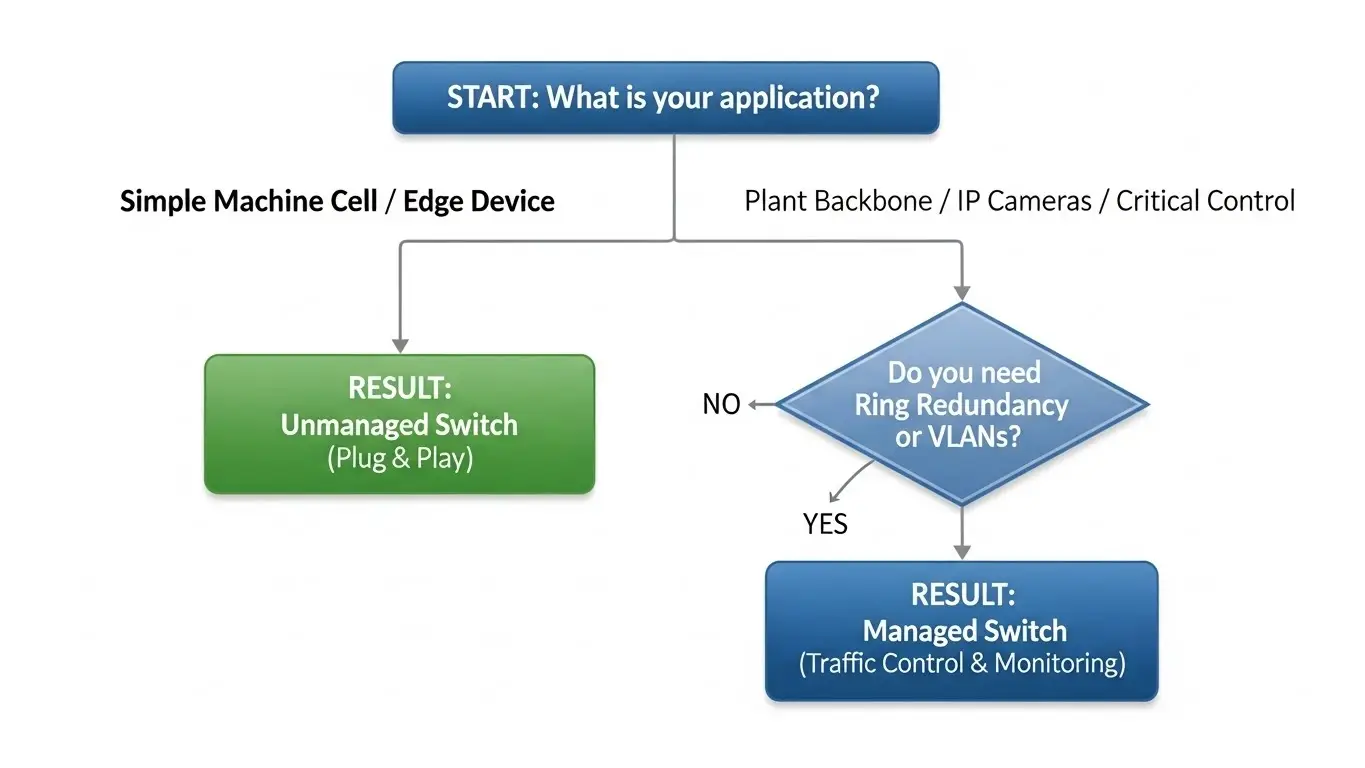
A managed switch allows you to configure, manage, and monitor your LAN. It is the "brain" of your network infrastructure.
- Best For: Plant-wide backbones, IP surveillance systems, and critical automation lines (PLC/SCADA).
- Critical Features:
- VLANs (Virtual Local Area Networks): Segregate video traffic from control data so your cameras don't slow down your PLCs.
- RSTP (Rapid Spanning Tree Protocol): Prevents loops and allows for redundant cabling paths.
- SNMP: Allows IT/OT managers to remotely monitor port health and temperature.
Power over Ethernet (PoE) in Industrial Automation
Power over Ethernet has revolutionized factory layouts by allowing data and power to run over a single Ethernet cable. This reduces cabling costs and simplifies installation for devices like IP cameras, VoIP phones, and Wireless Access Points (WAPs).
However, not all PoE is created equal. When selecting a switch, you must look at the IEEE Standard and the Total Power Budget.
- PoE (802.3af): Provides up to 15.4W per port. Sufficient for basic sensors or simple cameras.
- PoE+ (802.3at): Provides up to 30W per port. Required for PTZ (Pan-Tilt-Zoom) cameras or modern WAPs.
- PoE++ (802.3bt): Provides up to 60W or 100W. Necessary for high-power devices like digital signage or heavy-duty lighting.
The Power Budget Trap: A common mistake is buying a "24-port PoE switch" and assuming you can pull 30W from every port simultaneously. You must calculate the total wattage of all connected devices and ensure it is less than the switch's total power budget. If you exceed this, the switch will randomly drop devices to protect itself.
Network Redundancy and Reliability
In an office, if a cable breaks, one person loses internet. In a factory, if a backbone cable breaks, the line stops. This is why redundancy is a cornerstone of industrial networking.
Dual Power Inputs
Most robust industrial switches feature redundant DC power inputs. You can connect two separate power supplies (e.g., one mains-driven, one UPS-driven). If one PSU fails, the switch automatically draws from the second without a millisecond of interruption.
Ring Topology
While standard Ethernet relies on a "Star" topology, industrial networks often use a "Ring" topology. If the ring is broken at any point (e.g., a cable is cut), the traffic instantly reverses direction to reach the destination. Protocols like ERPS (Ethernet Ring Protection Switching) can recover a network in less than 50 milliseconds—fast enough that most PLCs won't even register a fault.
Installation and Maintenance Best Practices
Even the best hardware will fail if installed incorrectly. While we cover the essentials below, you can find a comprehensive walkthrough in our Industrial Switch Installation Guide. Based on our field assessments, here are the top installation factors that impact longevity:
- DIN-Rail Spacing: Industrial switches are typically fanless, relying on their metal casing to dissipate heat. Never cram them tightly between other warm devices. Always leave the manufacturer-recommended air gap (usually 2-3cm) on the sides.
- Grounding is Mandatory: The grounding screw on the switch isn't a suggestion. In a factory full of motors and VFDs (Variable Frequency Drives), floating grounds can build up static charge that eventually fries the Ethernet ports.
- Cable Shielding: In high-EMI environments (near welding cells or large drives), use STP (Shielded Twisted Pair) cables and ensure the shield is grounded at the switch end.
Future-Proofing Your Facility (IIoT and TSN)
Manufacturing is moving toward higher data density. The days of 10/100 Mbps being "good enough" are fading. As we integrate high-resolution vision systems and massive data collection for IIoT (Industrial Internet of Things), bandwidth requirements are surging.
For new installations, Gigabit Ethernet is now the standard baseline. Furthermore, forward-thinking facilities are looking at TSN (Time-Sensitive Networking), which allows standard Ethernet to provide the deterministic real-time control previously reserved for specialized fieldbuses.
Conclusion
Selecting the right industrial network infrastructure is about balancing cost against the risk of downtime. While it might be tempting to save money on network hardware, a ruggedized, managed industrial switch is an insurance policy for your production targets.
By prioritizing environmental hardening, proper power budgeting, and redundancy, you build a network that serves as a silent, reliable foundation for your manufacturing success.
Ready to upgrade your infrastructure? Explore the full range of ruggedized networking solutions at HX-Switch.eu. Our engineers are ready to help you spec the perfect switch for your unique environment.
Frequently Asked Questions
Technically yes, but it is risky. Even in an enclosure, office switches are not rated for the vibration, shock, or extended temperature fluctuations common in factories. They also lack redundant power inputs (12-48VDC) required for control cabinets.
RJ45 ports use standard copper Ethernet cables for short distances (up to 100m). SFP (Small Form-factor Pluggable) ports allow you to insert fiber optic modules, enabling connections over kilometers without signal loss or electromagnetic interference.
IP30 is standard for switches inside a control cabinet (protected against tools/wires >2.5mm, but not water). IP67 switches are waterproof and dustproof, designed to be mounted directly on a machine outside of a cabinet.
Fans are the first moving part to fail in dusty environments. When a fan fails, the switch overheats and dies. Industrial switches use passive cooling (heatsinks/metal cases) to eliminate this failure point, ensuring a longer lifespan.
For small setups (1-4 cameras), unmanaged is fine. For larger systems, a managed switch is recommended to use large packet support (Jumbo Frames) and VLANs to keep video traffic from bogging down the rest of the network.
