





How Tact Switch Actuation Force Works: The Engineering Guide
Understanding how tact switch actuation force works is the difference between a premium product feel and a cheap, unreliable interface. Whether you are designing a medical device or a consumer remote, the "click" defines the user experience. This guide breaks down the physics, measurement standards, and haptic ratios that engineers must master.
What Exactly Is Tact Switch Actuation Force?
Actuation force is the specific amount of physical pressure required to collapse the internal dome and close an electrical circuit. Measured in gram-force (gf) or Newtons (N), this peak load point determines when the switch triggers a signal and provides tactile feedback to the user.
Most datasheets list this as "Operating Force" (OF). However, understanding the mechanics goes beyond a single number. When you press a button, you aren't just pushing a spring. You are overcoming the resistance of a bistable mechanism—usually a metal or silicone dome.
The actuation force represents the "point of no return." Once you exceed this force, the dome snaps downward. This sudden drop in resistance creates the distinct "click" feeling. If you select the wrong force, your device might suffer from accidental presses or feel frustratingly stiff.
How Does the Internal Mechanism Create Force?
The internal mechanism creates force through the deformation of a curved dome that stores and releases potential energy. As pressure is applied to the plunger, the dome resists until it reaches a critical stress point, causing it to snap concave and contact the stationary contacts below.
Let’s look at the physics happening inside the housing.
- The Pre-Travel Phase: As your finger touches the plunger, the resistance increases linearly. The dome is bending but hasn't buckled yet.
- The Peak Force Point: This is the rated actuation force (e.g., 160gf). The dome can no longer support the load in its current shape.
- The Snap Action: The dome collapses instantly. This is a non-linear event. The resistance drops significantly, often by 30-50%.
- Contact Closure: The center of the dome hits the PCB pads (or internal terminals), closing the circuit.
Engineer’s Note: In my experience troubleshooting prototypes, "mushy" buttons often aren't broken. They usually suffer from a misalignment where the plunger doesn't hit the absolute center of the dome, artificially increasing the required force and killing the snap.
How Is the Force-Stroke Curve Measured?
The Force-Stroke (F-S) curve is measured using a specialized force gauge that plots resistance against the distance the plunger travels. This graph visually represents the switch's personality, showing the peak actuation force, the drop in resistance (click ratio), and the return force.
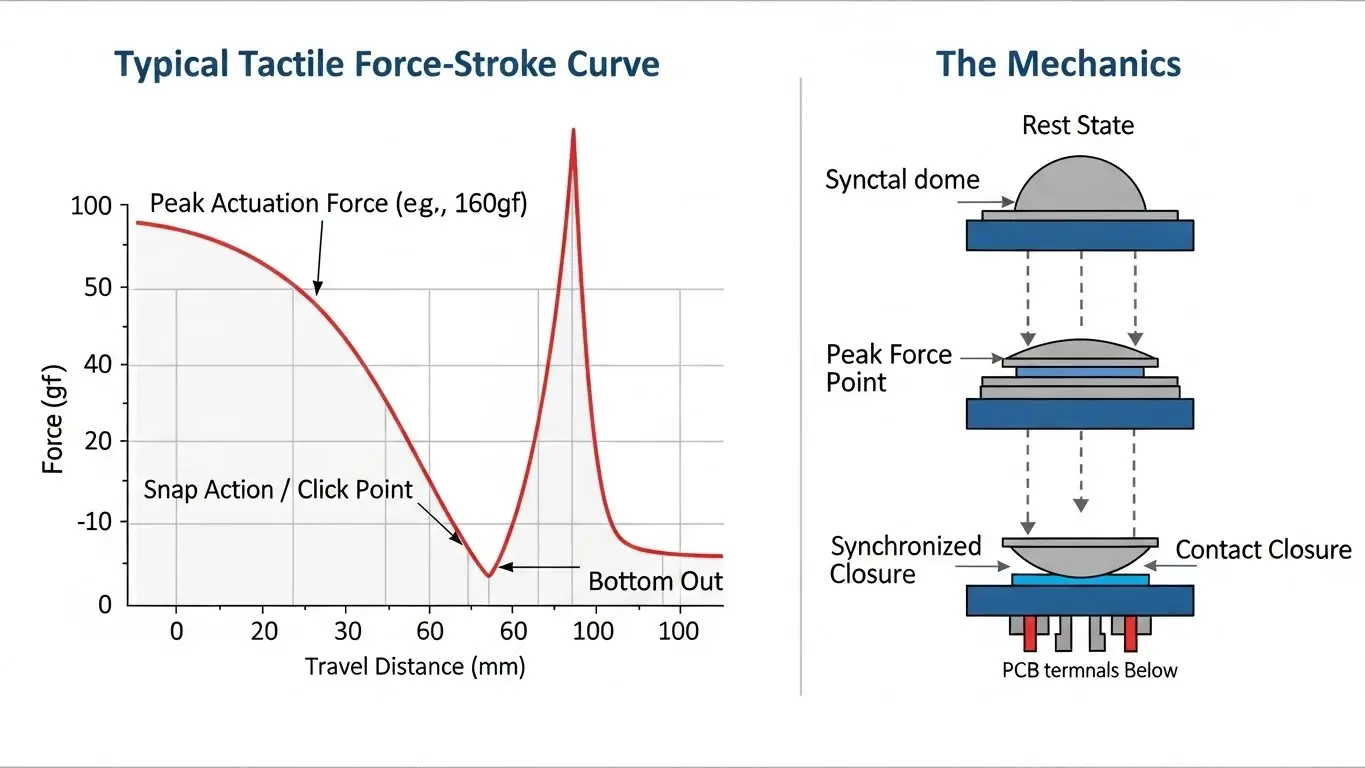
If you are evaluating switches, you cannot rely on the rated force alone. You need the curve.
- X-Axis (Stroke): How far the button travels (measured in millimeters).
- Y-Axis (Force): How much pressure is applied (measured in grams).
A steep rise followed by a sharp drop indicates a "crisp" or "snappy" switch. A shallow curve indicates a "soft" or silent switch. Understanding these curves is essential for haptics. For a broader perspective on electromechanical mechanics, you can review our Micro Switch Deep Dive, which analyzes similar snap-action behaviors in larger components.
What Is the Difference Between Actuation Force and Return Force?
Actuation force is the pressure needed to close the switch, while return force is the energy the dome exerts to push the plunger back up. A high return force prevents the switch from sticking, ensuring it resets quickly for the next press.
This distinction is vital for safety-critical applications.
- Actuation Force (OF): The "Make" point.
- Return Force (RF): The reset point.
If the Return Force is too low, the button might get stuck under the weight of a heavy keycap. This is a common failure mode in custom keyboards. We see this relationship mirrored in various switching technologies. Just as we discuss in our Micro Switch Deep Dive, the balance between the "snap down" and the "snap back" defines the component's lifespan and reliability.
Why Does the "Click Ratio" Matter?
The Click Ratio is a calculated percentage that defines the "crispness" of the tactile feedback. It is determined by the formula (Operating Force - Click Point Force) / Operating Force. A higher percentage results in a sharper snap, while a lower percentage feels softer and quieter.
Here is how the ratio translates to real-world feel:
| Click Ratio | Feel Description | Typical Application |
| < 30% | Soft, quiet, "mushy" | Automotive dashboards, audio equipment |
| 30% - 50% | Standard, defined click | Consumer electronics, remote controls |
| > 50% | Sharp, loud, distinct snap | Industrial controls, membrane keypads |
I always advise clients to check the Click Ratio if the device will be used with gloves. A high click ratio (sharp snap) provides the necessary feedback through thick fabric, confirming the input was received without looking at a screen.
Does Temperature Affect Actuation Force?
Yes, temperature significantly affects actuation force, particularly in switches using silicone rubber domes or specific metal alloys. Cold temperatures can stiffen materials, increasing the required force, while high heat can soften internal components, reducing tactile feedback.
Standard metal domes are relatively stable. However, if your application uses a sealed tact switch with a rubber actuator for waterproofing, expect variance.
- In Freezing Conditions: Rubber hardens. A 160gf switch might require 200gf to actuate.
- In High Heat: Metal fatigue accelerates. Over time, the dome loses its "memory," resulting in a permanent drop in actuation force.
For rigorous environments, always request specific tolerance data from your manufacturer.
Comparison of Common Actuation Forces
Standard actuation forces range from ultra-light (70gf) for rapid input to heavy (500gf+) for safety controls. Selecting the correct range depends on the frequency of use and the need for accidental press prevention.
Here is a quick reference guide for selection:
Light Force (70gf – 130gf)
- Best for: Rapid repetition.
- Use Case: Computer mice, gaming controllers.
- Pro: Reduces finger fatigue.
- Con: Easy to press accidentally.
Standard Force (160gf – 200gf)
- Best for: General purpose input.
- Use Case: Smartphones, microwaves, control panels.
- Pro: Perfect balance of feedback and ease of use.
- Con: Can feel generic.
Heavy Force (260gf – 500gf+)
- Best for: Critical inputs and harsh environments.
- Use Case: Automotive interfaces, industrial emergency stops.
- Pro: Prevents accidental activation; works well with gloves.
- Con: Causes fatigue if used frequently.
Conclusion
Mastering how tact switch actuation force works allows you to dictate the quality of your product. It is not just about closing a circuit; it is about the physics of the user interface. By analyzing the Force-Stroke curve, calculating the Click Ratio, and accounting for environmental factors, you ensure reliability.
For engineers looking to expand their knowledge on electromechanical reliability and snap-action physics, I highly recommend reading our Micro Switch Deep Dive. It covers the foundational mechanics that apply across all switching technologies.
Frequently Asked Questions (FAQ)
In most tactile switch datasheets, "Actuation Force" and "Operating Force" are synonymous. They both refer to the peak force required to collapse the dome. However, always verify if the manufacturer distinguishes between the peak force and the contact force (the force required to maintain the electrical connection).
No, the force is determined by the physical properties of the internal metal or silicone dome. To change the force, you must replace the switch entirely. Attempting to modify the dome usually destroys the tactile feel.
A "mushy" feel often results from a low "Click Ratio" (under 30%) or poor mechanical integration. If the external button (the plastic cap the user touches) is dragging against the housing or is misaligned with the switch plunger, it absorbs the snap, killing the tactile feedback.
Professional testing requires a Force-Displacement gauge (like an Instron machine). For a rough field test, you can use calibrated weights, but this won't show you the critical Force-Stroke curve or the click ratio.
Automotive applications typically require heavier forces, usually 260gf to 400gf. This higher resistance prevents vibrations from the road from accidentally triggering the switch and ensures the driver can feel the click even while wearing gloves.
