





DIP Switches for Smart Home Devices: The Bridge to Modern Automation
DIP switches for smart home devices are the hidden gatekeepers of your home's legacy automation. While modern devices use software pairing, millions of ceiling fans, automated blinds, and garage door openers still rely on these manual toggle switches to set unique radio frequencies (RF). By matching the pattern on your handheld remote to the receiver inside the device, you create a "fixed code" connection. Understanding these physical switches is the secret to bringing "dumb" appliances into your modern smart home ecosystem using RF-to-WiFi bridges.
What Are DIP Switches doing in a "Smart" Home?
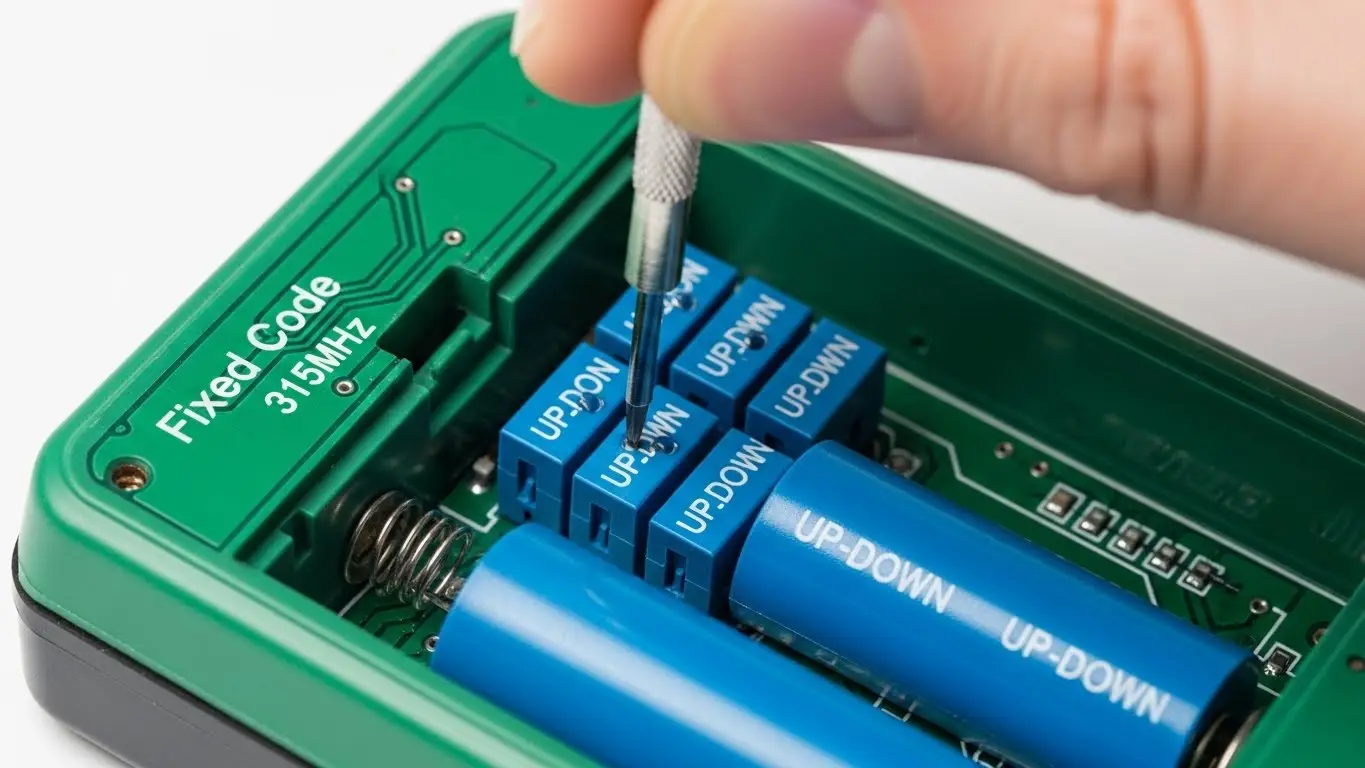
If you crack open the battery compartment of a ceiling fan remote or the back of an old garage door clicker, you’ll likely see a small block of 4 to 12 tiny sliding switches. These are Dual In-line Package (DIP) switches.
In the context of home automation, they serve one primary purpose: Identity.
- Signal Isolation: If your neighbor buys the same brand of ceiling fan, their remote might turn on your lights. DIP switches allow you to set a unique binary code (e.g., Up-Down-Up-Down) so your device only listens to your remote.
- Legacy "Pairing": Before Bluetooth and Zigbee, this was how you "paired" devices. There is no "discovery mode"; the transmitter and receiver must simply match physically.
How to Configure DIP Switches for Smart Hub Integration
The biggest opportunity for homeowners is bridging these older devices to modern platforms like Amazon Alexa or Google Home. You don't need to replace the fan; you just need a "translator" device like the Bond Bridge or BroadLink RM4 Pro.
Step 1: Reveal the Code
Locate the DIP switches on your original physical remote. They are often hidden inside the battery cover. Note the pattern.
- Example: Switch 1: ON, Switch 2: OFF, Switch 3: ON, Switch 4: OFF.
Step 2: The "Clone" Process
Smart hubs work by "listening" to the radio frequency (usually 303MHz, 315MHz, or 433MHz) your remote sends.
- Open your smart hub app (e.g., Bond Home).
- Select "Add Device" > "Ceiling Fan."
- The app will ask you to point your remote at the hub and press a button (e.g., "Fan High").
- Because the DIP switches create a Fixed Code, the hub can memorize this exact signal and replay it later.
Pro Tip: If you have lost your original remote, you can look at the DIP switches on the receiver unit (usually in the fan canopy) and buy a universal replacement remote. Set the new remote's switches to match the receiver, and you're back in business.
DIP Switches vs. Rolling Codes: A Security Warning
Not all DIP switch devices are equal. It is vital to distinguish between Fixed Code and Rolling Code.
- Fixed Code (Most DIP Switch Devices): Every time you press the button, it sends the exact same signal. This is fine for lights and fans.
- Rolling Code (Modern Garage Openers): These change the password every time.
- The Trap: Some older garage openers use DIP switches and are therefore fixed code. This means a thief could use a "code grabber" to record your signal and open your garage later.
- Recommendation: If your garage opener relies solely on DIP switches, do not integrate it into a smart hub for external access. It is safer to upgrade to a modern opener with encrypted rolling codes.
For more on industrial-grade security and switch selection, refer to our guide on DIP switches for industrial machines.
Troubleshooting: Why Won't My Hub Learn the DIP Switch?
If your smart bridge fails to learn the command from your DIP switch remote, check these three common culprits:
1. Frequency Mismatch
DIP switches control the data, but the carrier frequency is set by a crystal inside the remote.
- US Standard: 303 MHz or 315 MHz.
- Global/Modern: 433.92 MHz.
- The Fix: Check the back of your remote. If it says "298 MHz" or "49 MHz," most modern WiFi bridges (like BroadLink) cannot hear it. You may need a specialized bridge.
2. The "3-Position" Confusion
Most DIP switches have two positions (ON/OFF). However, some older fans (like Casablanca) use 3-position DIP switches (UP, MIDDLE, DOWN).
- The Fix: Ensure your replacement remote or smart hub settings explicitly support "Trinary" or 3-position switches.
3. Battery Voltage
An old remote might have enough power to trigger the fan but not enough signal strength for a smart hub to "learn" it cleanly. Always use fresh batteries during the setup process.
Frequently Asked Questions
Yes, but with a catch. If you install a smart wall switch (like Lutron Caséta) to cut power to the fan, you lose speed control. The better path is to keep the power "ON" at the wall and use a Bond Bridge to mimic the DIP switch remote commands for speed and light control.
Look at the front of the remote. If there is a small LED bulb (like a TV remote), it is Infrared (IR). If there is no bulb and it works through walls, it is Radio Frequency (RF). DIP switches are almost exclusively used in RF remotes.
Interference. If your fan turns on randomly, your neighbor likely has the same brand and default settings. Change your DIP switches to a random, unique pattern to solve this.
Generally, no. DIP switches are passive components. "Smart" functionality comes from the controller reading the switch. For active switching needs, engineers might look at tact switches for consumer electronics.
It is less safe than modern openers. DIP switch openers use "Security+" (rolling code) predecessors. If security is a major concern, consider upgrading the opener rather than just bridging it.DIP switches for smart home devices
Key Takeaways
- The Bridge is Key: DIP switches allow legacy devices to communicate with modern RF-to-WiFi bridges like Bond and BroadLink.
- Match the Pattern: There is no "pairing mode"—simply matching the switch positions on transmitter and receiver connects the device.
- Security Check: Avoid using DIP switch-based remotes for critical entry points (like gates) due to "Fixed Code" vulnerability.
- Frequency Matters: Ensure your smart hub supports the specific frequency (e.g., 303MHz vs 433MHz) of your DIP switch remote.
Conclusion
DIP switches for smart home devices are a bridge between the analog past and the digital future. They may look like tiny, confusing toggles, but they offer a reliable, hack-proof way to configure your device's identity. By mastering these switches, you can save hundreds of dollars by making your existing "dumb" appliances smart, rather than replacing them.
