





DIP Switches for Remote Control Systems: The Physical Key to Wireless Security
In a world of "smart pairing" and Bluetooth handshakes, DIP switches for remote control systems remain the steadfast, physical backbone of wireless communication. Whether it’s a heavy-duty industrial crane or a standard ceiling fan, these tiny electromechanical components perform a critical job: they define the device's identity.
While modern consumer tech has moved toward "rolling codes" (which change passwords every second), millions of devices still rely on the "fixed code" stability of DIP switches. This guide bridges the gap between consumer DIY repair and industrial safety protocols, offering insights you won't find in a basic user manual.
Why Do We Still Use "Old School" DIP Switches?
DIP switches offer "set-and-forget" reliability that software cannot match, providing a physical, visual verification of settings without needing a diagnostic screen.
In industrial environments, a tact switch might fail after millions of cycles, but a DIP switch is set once and stays there. This permanence is vital for safety.
- Interference Rejection: If your neighbor’s garage door opener opens your door, a quick flip of Switch #4 creates a new, unique 8-bit code that blocks the stray signal.
- Hardware "Air Gap": Unlike software-defined radios that can be hacked remotely, a DIP switch setting can only be changed by someone physically holding the device.
How to Configure DIP Switches for Garage Doors & Fans
The "Pairing" process is actually a "Matching" process: the transmitter (remote) and receiver (motor unit) must have identical switch positions to communicate.
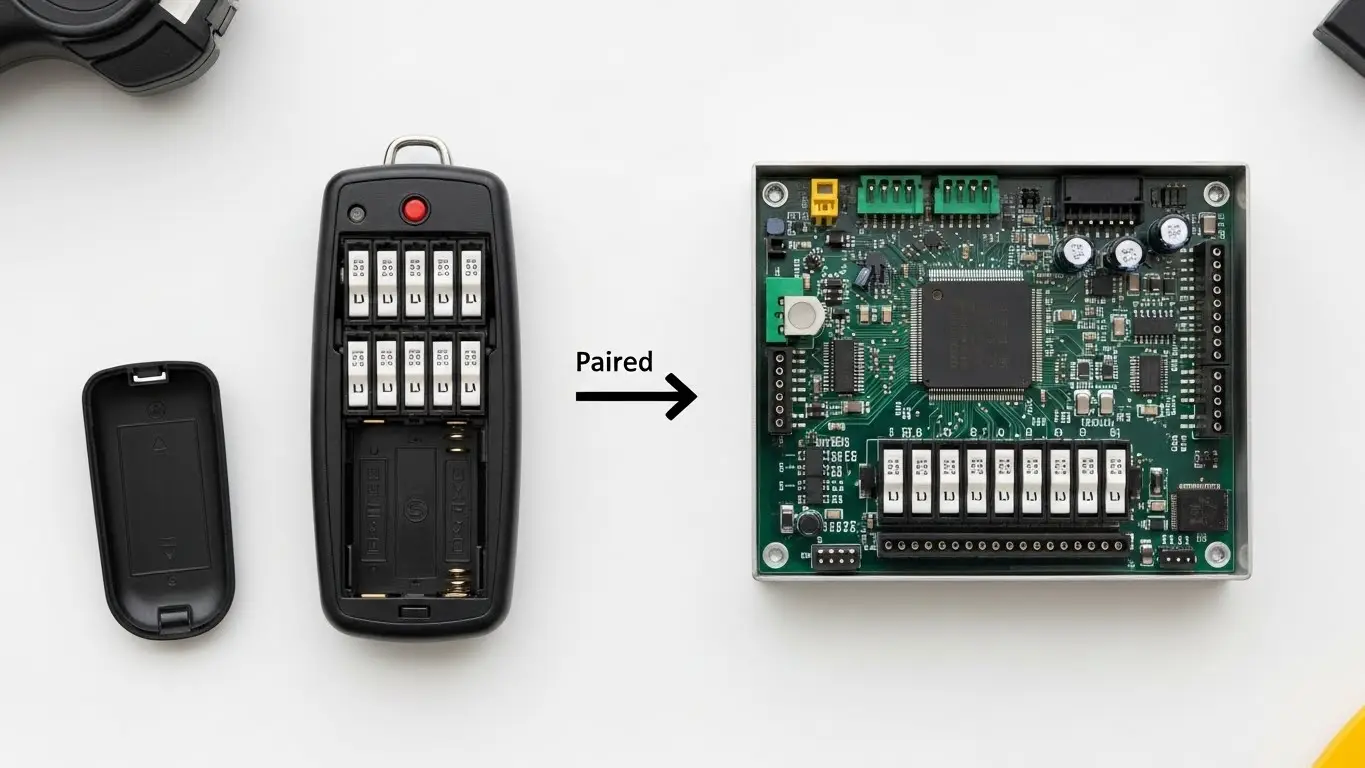
The 3-Step Matching Protocol
- Locate the Banks: Open the battery compartment of your remote and the back panel of your receiver (motor). You will see a row of 8 to 12 tiny sliders.
- Mirror the Pattern: If Switch 1 is "UP" on the receiver, it must be "UP" on the remote.
- Critical Detail: Some brands label positions "1, 2, 3" (Trinary) instead of just "ON/OFF" (Binary). A mismatch here is the #1 cause of failure.
- Frequency Check: Ensure both devices operate on the same carrier frequency (commonly 300 MHz, 310 MHz, or 390 MHz). A DIP switch cannot change the chip's base frequency; it only changes the encoded data packet.
Industrial Remote Controls: A Different Beast
While consumer remotes use DIP switches for security, industrial remotes (like HX Switch's industrial components) use them to define operational logic and safety limits.
In high-stakes environments like overhead cranes or concrete pumps, a "phantom signal" could be fatal. Here, DIP switches are often replaced or augmented by "Data Keys"—physical modules that store the code—but internal DIPs still govern the machine's "personality."
- Master/Slave Configuration: Two remotes can control one crane. DIP switches on the internal decoder board designate which remote is the "Master" (priority control) and which is the "Slave."
- Frequency Hopping Limits: Industrial remotes hop frequencies to avoid interference. DIP switches can manually lock out noisy channels that interfere with onsite Wi-Fi.
Troubleshooting: Why Your Remote Won't Pair
The most common failures are not electronic, but mechanical: dirty contacts, "floating" switches, or frequency drift.
1. The "Graphite Short" Risk
Never use a pencil to flip a DIP switch. Graphite is conductive. A microscopic shard of pencil lead can bridge the contacts, permanently shorting the switch to "ON." Always use a plastic stylus or a small flathead screwdriver.
2. The "Floating" Switch
A switch left in the middle position (neither fully ON nor fully OFF) creates an "indeterminate state." The receiver might read it as a 1 today and a 0 tomorrow, causing intermittent failure.
- Solution: Exercise the switch by sliding it fully back and forth 3 times to clean the oxidation from the internal gold contacts.
3. Frequency Drift vs. Switch Setting
If your DIP settings are perfect but the range is terrible, the remote's analog crystal may have drifted. No amount of DIP switching will fix this.
- Test: Hold the remote directly against the antenna. If it works there but not 5 feet away, the problem is RF drift, not the code.
Troubleshooting Checklist
| Symptom | Probable Cause | Fix |
| Works intermittently | Floating Switch / Oxidation | Cycle switches back & forth |
| Light on remote, no action | Code Mismatch | Check "Mirror Image" setting |
| Range < 5 feet | RF Oscillator Drift | Replace remote (DIPs are fine) |
| Neighbor activates device | Duplicate Code | Change at least 3 switch positions |
Future Trends: The Hybrid Era
Why? Because in an emergency, a technician needs to be able to verify the safety configuration visually, without needing a laptop or password. This "hardware truth" keeps DIP switches relevant in:
- Router Configuration: Setting hard resets and baud rates.
- Smart Home Bridges: Linking legacy RF fans to modern Wi-Fi hubs like Bond Bridge.
Frequently Asked Questions
Generally, no. Even if both remotes have 10 switches and transmit at 300 MHz, the encoding chip (how the binary data is formatted) often differs between brands (e.g., Chamberlain vs. Linear). You need a "Universal" remote specifically designed to emulate multiple encoding protocols.
A Binary switch has 2 positions (ON/OFF), allowing $2^n$ code combinations. A Trinary switch has 3 positions (+, 0, -), allowing $3^n$ combinations. You cannot pair a Binary remote with a Trinary receiver directly; you need a compatible translator remote.
Since DIP switch remotes use "Fixed Codes," they can be cloned by "code grabbers." For high-security gates, avoid using the factory default settings (e.g., all OFF or alternating). Create a random, complex pattern. For maximum security, upgrade to a system that supports DIP switches for communication devices with rolling code encryption.
Safety regulations (like ISO 13849) often favor hardware-based configuration because it is immune to software bugs, firmware corruption, or remote hacking. A DIP switch's state is absolute and non-volatile.
Key Takeaways
- Security via Obscurity: Always change the factory default DIP pattern to prevent accidental activation by neighbors or simple scanning attacks.
- Visual Verification: In industrial settings, DIP switches allow safety officers to visually confirm configuration settings (like Master/Slave modes) without powering on the device.
- The "Mirror" Trick: If a standard code match fails, try inverting the pattern—a common undocumented fix for legacy receiver boards.
- Hardware First: Before blaming the battery, "exercise" the switches to clear oxidation, a common issue in humid environments.
