





Best Alternatives to DIP Switches: The Definitive Guide for Modern PCB Design
Are you still relying on bulky, manual DIP switches for your circuit configurations? While they have been a staple in electronics for decades, finding the best alternatives to DIP switches is often the first step toward modernizing your PCB designs, saving board space, and improving user experience. Whether you are designing a compact IoT device or a rugged industrial controller, shifting away from traditional dual in-line package switches can significantly enhance your product's reliability and functionality.
In this comprehensive guide, we will explore the most effective hardware and software replacements for DIP switches, ranging from simple jumpers to sophisticated non-volatile memory configurations.
What Are the Best Alternatives to DIP Switches?
The best alternatives to DIP switches include rotary coded switches for easier manual actuation and jumpers (headers and shunts) for cost-effective, semi-permanent settings. For digital-first designs, software configurations using microcontroller GPIOs with internal pull-up resistors or non-volatile memory (EEPROM) are superior choices that eliminate physical components entirely.
The Evolution of Configuration: Moving Beyond the DIP
For years, the standard "piano" or "slide" style DIP switch was the go-to method for setting device addresses, baud rates, or termination resistance. However, as devices shrink and enclosures become more sealed, the need for alternatives has grown.
The "best" alternative depends heavily on your specific constraint:
- Space Constraints: Use Solder Bridges or 0-Ohm Resistors.
- User Frequency: Use Rotary Coded Switches or Tactile Buttons with LED feedback.
- Cost: Use Pin Headers and Jumpers.
- Automation: Use Firmware Configuration (EEPROM/Flash).
Below, we categorize these alternatives into Hardware and Software solutions to help you map the right choice to your specific application.
Hardware Alternatives: What Can Physically Replace a DIP Switch?
Hardware alternatives like jumpers, rotary switches, and solder bridges physically replace DIP switches by maintaining a manual circuit selection method but offering better density, lower cost, or improved durability. These are ideal when a physical "hard" setting is required for safety or legacy compatibility.
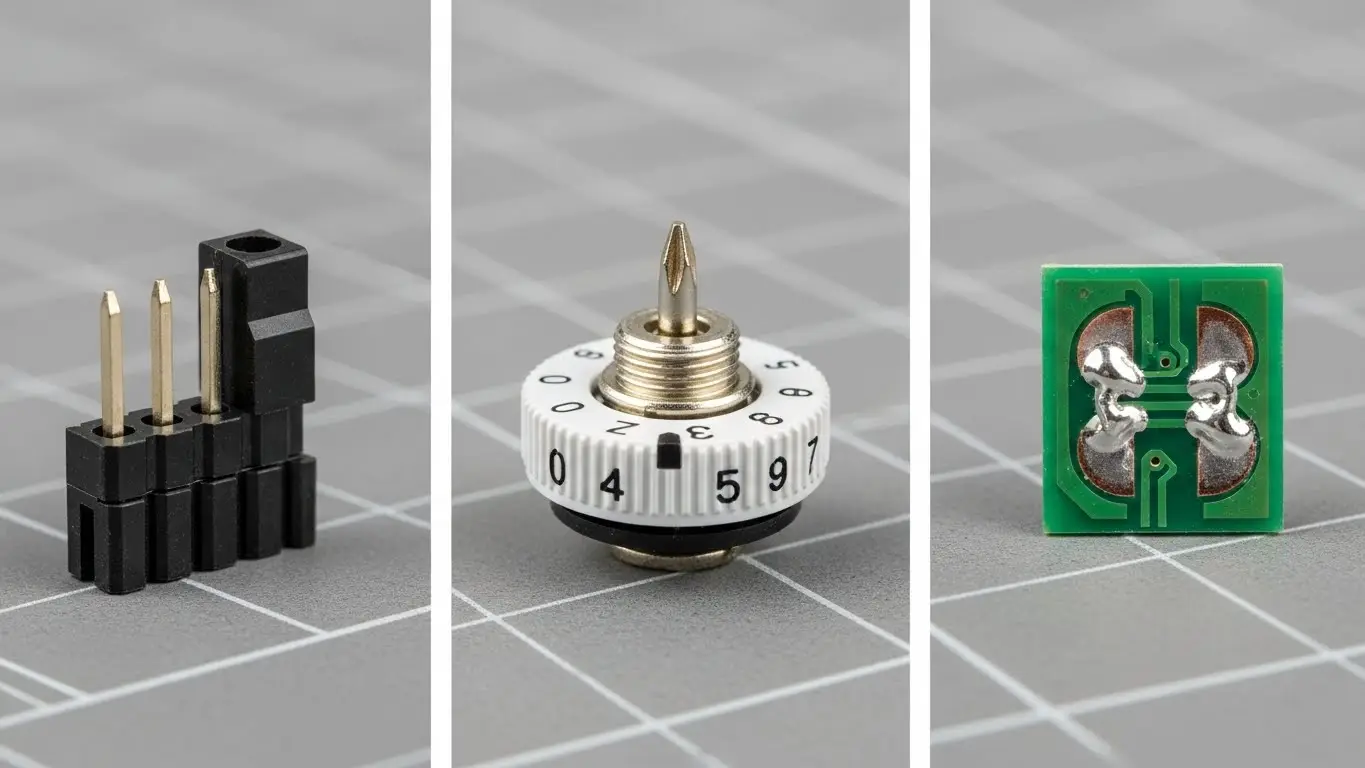
1. Jumpers and Pin Headers (The Cost-Effective Classic)
The most direct alternative to a DIP switch is the humble jumper shunt and pin header.
- How it works: A small plastic shunt containing a metal clip bridges two pins on a standard 2.54mm (0.1") or 1.27mm pitch header.
- Pros: Extremely low cost; very reliable vibration resistance (if high-quality shunts are used); clear visual indication of state.
- Cons: Parts can be lost (the "dropped shunt" problem); difficult to change in tight spaces.
Pro Tip: Use "shrouded" headers if you are working in high-vibration environments to prevent the jumper from wiggling loose.
2. Rotary Coded Switches (The User-Friendly Upgrade)
If you need to set a network address (like a Modbus ID) without binary math, rotary switches are superior.
- How it works: A single rotating actuator selects a position (0-9 or 0-F). Internally, the switch connects the common pin to a binary output (1, 2, 4, 8) representing that number.
- Pros: Much easier for end-users (setting "ID 5" is just turning to "5", rather than flipping switches 1 and 3); sealed IP67 versions are available.
- Cons: More expensive than standard DIP switches; taller profile.
3. Solder Bridges (The "Set and Forget" Method)
For settings that never change after the factory (e.g., regional frequency settings), solder bridges are the ultimate space saver.
- How it works: Two exposed pads on the PCB are close enough that a drop of solder can bridge them.
- Pros: Zero component cost; zero height; immune to vibration.
- Cons: Requires a soldering iron to change; not user-friendly.
Software Alternatives: How Do You Replace DIP Switches with Code?
Software alternatives replace physical switches by storing configuration data in the device's non-volatile memory or reading logical states via microcontroller pins. This eliminates mechanical failure points, reduces BOM (Bill of Materials) cost, and allows for remote configuration updates.
1. Microcontroller GPIOs & Internal Pull-Ups
Modern microcontrollers (MCUs) have built-in internal pull-up or pull-down resistors. You can replace a bank of 8 DIP switches with a simple header interface or even just board traces.
- Implementation: instead of a switch, you can have a "Configuration Mode" where the user presses a button on startup, and the device cycles through LED patterns to select a mode.
- Benefit: Reduces component count to zero if using existing buttons/LEDs.
2. Non-Volatile Memory (EEPROM / Flash)
Why use a switch to store a setting when your chip has memory?
- Implementation: Store settings like Baud Rate, Unit ID, or PID constants in the MCU's EEPROM. These can be set via a USB connection, a web interface, or a mobile app during installation.
- Advantage: Infinite expandability. A physical 8-position DIP switch gives you 256 options. A 4-byte integer in EEPROM gives you 4 billion options.
3. Digital Potentiometers and Switches
For analog calibration that used to be done with trim pots or switch banks, Digital Potentiometers (DigiPots) allow the MCU to adjust resistance dynamically.
Comparison Table: DIP Switch vs. Alternatives
The following table compares the most common alternatives based on cost, durability, and user experience (UX) to help you make a quick decision.
| Feature | DIP Switch | Jumper / Header | Rotary Switch | Software (EEPROM) |
| Cost | Medium | Low | High | Lowest (Zero) |
| PCB Space | Large | Medium | Medium | Zero |
| Ease of Change | Medium | Low (Easy to lose) | High (Intuitive) | Variable (Requires UI) |
| Durability | Low (Dust/Debris) | High | High (Sealed) | Infinite |
| Visual Feedback | Good (On/Off) | Good | Excellent (Numbers) | None (Requires Screen/LED) |
| Best For | Legacy Hardware | Prototyping | Address Setting | Mass Production / IoT |
When Should You Stick with Traditional DIP Switches?
You should stick with traditional DIP switches when you need a "physical air gap" for security, require configuration without power, or are maintaining legacy compatibility. They provide a tangible, visual confirmation of settings that software cannot replicate without a display.
Sometimes, the "old way" is still the right way. In industrial automation, field technicians often prefer DIP switches because they can verify a setting (like a termination resistor being ON) before powering up the cabinet. Software settings require the device to be on and a laptop to be connected, which isn't always feasible in the field.
Natural Network Integration
If you are designing networking equipment, you might be looking to replace DIP switches used for VLAN or Ring redundancy configurations. In modern setups, these are often handled by managed switches. For example, if you are exploring how to upgrade your broader network infrastructure, you might find our guide on Industrial Ethernet Switch Alternatives useful for understanding how software-defined networking is replacing physical hardware toggles on a macro scale.
How to Choose the Right Alternative (Decision Framework)
To choose the right alternative, apply the "User-Access Frequency" rule: If the user changes it daily, use a physical switch or button. If it is changed once at install, use a rotary switch or jumpers. If it is never changed after the factory, use solder bridges or firmware.
The "FAME" Framework for Component Selection
When selecting a component to replace a DIP switch, ensure it meets these criteria:
- Functional: Does it provide the necessary number of states (binary vs. hex)?
- Accessible: Can the user reach it when the enclosure is closed? (Software is best here).
- Mapped: Is the setting clearly mapped? (Rotary switches map numbers directly; DIPs require a lookup table).
- Economical: Does the replacement cost exceed the value of the feature?
Conclusion
Replacing DIP switches is more than just a component swap; it's a design philosophy shift. By moving toward rotary switches for user friendliness or firmware configurations for reliability and cost savings, you create a product that is more robust and easier to support.
Whether you choose the low-cost simplicity of a jumper or the infinite flexibility of EEPROM, the best alternative is the one that aligns with your user's environment and your manufacturing capabilities.
Frequently Asked Questions (FAQ)
A DIP switch consists of individual toggle switches (bits) that must be set in a binary pattern (e.g., On-Off-On). A rotary switch uses a single dial to select a value (0-9 or 0-F), which is internally converted to binary. Rotary switches are generally easier for humans to use as they don't require binary calculation.
Yes. You can replace the physical function of a DIP switch by storing settings in the microcontroller's non-volatile memory (EEPROM or Flash). You can change these settings via a software interface (USB, UART, or Web UI) rather than physically flipping switches.
Yes, standard pin headers and jumper shunts are significantly cheaper than DIP switches. However, they are less convenient for users to change and the shunts can be easily lost during configuration.
A Piano DIP switch is a variant where the actuators are on the side edge of the component rather than the top. This allows the switch to be mounted on the edge of a PCB and accessed from the side, similar to the keys on a piano. They are useful for board-edge access.
Industrial devices use DIP switches because they allow technicians to verify settings visually without powering up the device. They also provide a "hard" physical configuration that cannot be corrupted by software glitches or firmware resets.
