





How to Choose the Right Tact Switch
The tactile switch (or "tact switch") is often the most frequently used interface in modern electronics, yet it is also one of the most frequently underspecified components on a Bill of Materials (BOM).
In consumer electronics and industrial controls, the switch defines the user’s perception of quality. A poor selection leads to "mushy" buttons, inconsistent feedback, or early field failures due to dust and moisture intrusion.
At HX Switch, we understand that selecting a switch is not just about fitting a footprint; it is about balancing manufacturing reliability with premium user experience. This guide outlines the engineering framework required to specify the correct tactile switch for your application. If you are still in the early stages of design and need a broader overview of electromechanical components, we recommend starting with our general guide on how to choose the right switch before diving into specific tactile requirements.
Determine the Mechanical Dimension and Profile
Before considering electrical specs, the physical constraints of the PCB design usually dictate the initial selection. Tactile switches come in standardized footprints, but the vertical profile is where integration errors often occur.
Standard Footprints
- 6x6mm: The industry standard. Offers the widest variety of actuation forces, stem heights, and IP ratings.
- 12x12mm: Larger surface area, typically used in industrial applications where easier operation with gloves is required.
- 3x6mm / 4x4mm: Compact footprints designed for high-density consumer electronics and wearables.
Height Measurement
A common error in specification involves the switch height. The "height" is measured from the bottom of the switch base (sitting on the PCB) to the top of the actuator stem.
Engineering Note: If your device uses a custom keycap or a membrane overlay, you must account for the "pre-travel" of the overlay. Selecting a stem that is too short will result in buttons that fail to actuate, while a stem that is too long places permanent stress on the internal dome, shortening its lifespan.
Define the "Feel" (Actuation Force and Travel)
The "haptic signature" of a product—how it feels to press a button—is determined by the relationship between Actuation Force (Operating Force) and Travel.
Actuation Force (OF)
Measured in grams-force (gf), this determines how hard the user must press to trigger the contact.
- 100gf - 130gf (Light): Soft touch, rapid input. ideal for data entry keypads where fatigue is a concern.
- 160gf (Standard): The most common specification. Provides a balanced, distinct click.
- 260gf+ (Heavy): Strong snap with high resistance. Essential for automotive or industrial interfaces to prevent accidental actuation.
The "Click Ratio"
Two switches can both be rated for 160gf but feel completely different. This is determined by the Click Ratio (or Tactile Ratio). This metric compares the peak actuation force to the return force.
A high click ratio (>50%) results in a sharp, crisp "snap" sound and feel. A low click ratio results in a softer, quieter, and smoother press. For premium consumer electronics, specifying the click ratio is just as important as the force itself.
Select the Right Mounting Style for Assembly
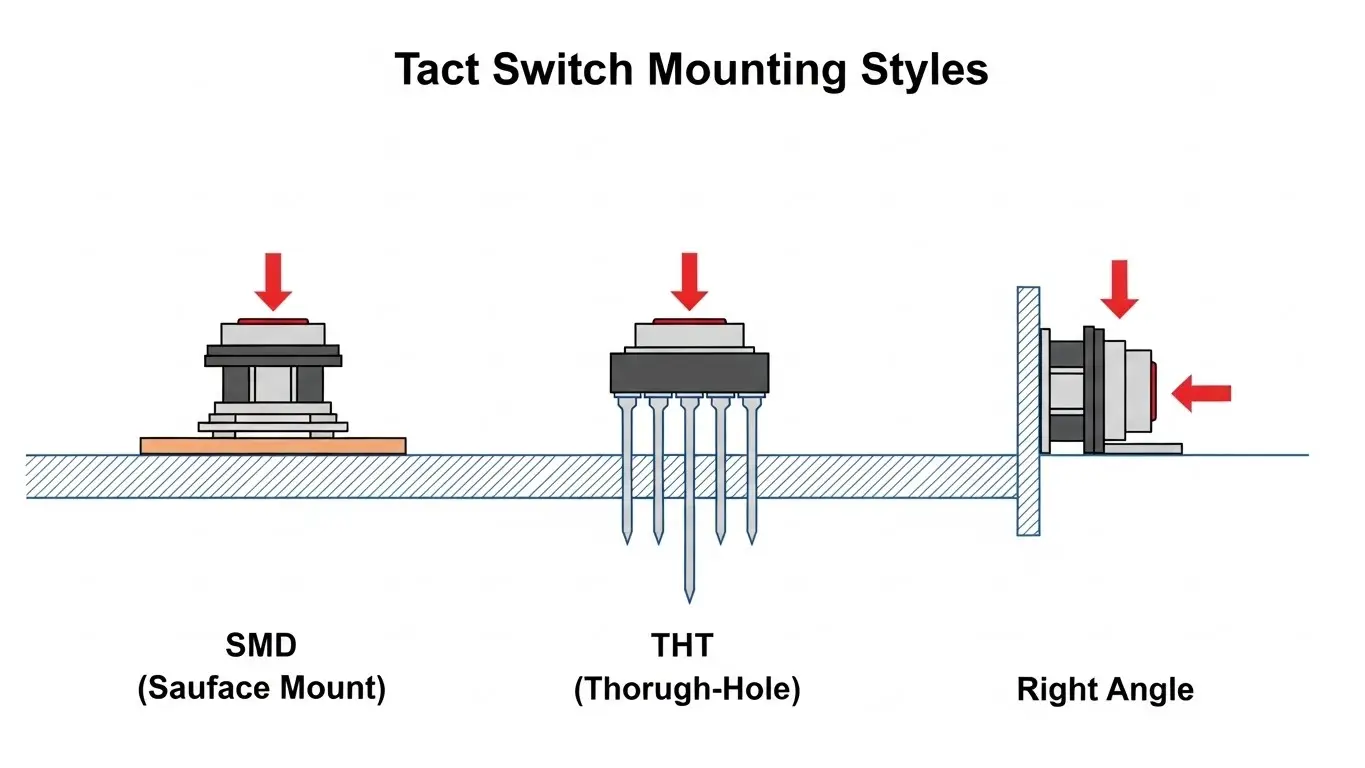
The mounting style affects not only the mechanical durability of the final product but also the efficiency of the assembly line.
Surface Mount (SMD)
Essential for high-volume automated manufacturing. SMD switches are placed by robotic vacuum nozzles and reflow soldered.
- Advantage: High component density; lower assembly cost.
- Consideration: Requires careful selection of casing materials (typically Polyamide or LCP) to withstand reflow oven temperatures without deformation.
Through-Hole (THT)
The switch pins go through the PCB and are wave soldered.
- Advantage: Superior mechanical shear strength. If the button will be subjected to high lateral force or rough handling, THT provides a stronger anchor than SMD pads.
- Consideration: Takes up space on both sides of the PCB.
Right Angle (Side Push)
Mounted on the edge of the PCB, allowing the button to be pressed from the side.
- Advantage: Critical for volume rockers, power buttons on tablets, and reset keys accessible from the device casing edge.
Reliability and IP Ratings (Sealing)
The operating environment dictates the sealing level. Using an unsealed switch in a harsh environment is the leading cause of contact resistance failure.
Standard (Unsealed)
Cost-effective and suitable for climate-controlled indoor environments (e.g., remote controls, office equipment).
IP67 (Sealed)
These switches feature an internal membrane or seal that protects the contact dome.
- Dust Tight: No ingress of dust.
- Water Immersion: Withstands immersion up to 1 meter for 30 minutes.
Manufacturing Recommendation: Even if the device is not used underwater, HX Switch recommends IP67 switches for any application that undergoes a water-wash process after soldering. Flux residue entering an unsealed switch during cleaning is a major cause of manufacturing defects.
Life Cycle and Materials
The lifespan of a tact switch is defined by the metal dome material.
- Phosphor Bronze: Economical, suitable for standard lifespans (50,000 – 100,000 cycles).
- Stainless Steel (SUS): High tensile strength and corrosion resistance. Required for high-reliability switches rated for 500,000 to 1,000,000+ cycles.
Electrical Specifications
Tact switches are designed for low-power "logic level" signaling. They are not intended to switch power directly to motors or high-wattage lights.
| Specification | Typical Value | Why it Matters |
| Contact Rating | 50mA @ 12VDC | Exceeding this causes arcing and rapid contact failure. |
| Contact Resistance | < 100mΩ | Low resistance ensures the microcontroller detects the signal cleanly without "debounce" errors. |
| Insulation Resistance | > 100MΩ | Prevents leakage current, which is critical for battery-powered devices. |
Conclusion
The tactile switch is small, but its impact on product reliability and user satisfaction is massive. By systematically defining the Dimension, Haptics, Mounting, and Sealing requirements, engineers can avoid the common pitfalls of "off-the-shelf" selection.
Summary Checklist for Engineers:
- Does the footprint fit the PCB density requirements?
- Is the Actuation Force appropriate for the target user (Light vs. Heavy)?
- Does the mounting style match the mechanical stress the button will face?
- Is an IP67 rating required for washing processes or outdoor use?
- Is the contact material rated for the required life cycles?
Need precise specifications? Contact the HX Switch engineering team for detailed datasheets, force-travel curves, and samples to validate your design.
Frequently Asked Question
The industry standard is typically 160gf. This offers a balanced tactile feel suitable for most consumer electronics. However, forces range from 100gf (light) to 520gf (heavy) depending on the application.
Only if they are sealed (IP67). Standard unsealed switches allow wash solution and flux to enter the housing, which contaminates the contact dome and leads to electrical failure.
A tact switch is a specific type of momentary switch characterized by a distinct "click" feedback and low-profile construction, designed for logic signals. "Push button" is a broader term that can include larger, non-tactile, or latching switches used for power control.
Height is measured from the bottom of the switch base (where it touches the PCB) to the very top of the actuator stem. It does not include the length of the terminal pins.
